What should you know before migrating from HubSpot to Attio?
By Daniel Hull ·
The single biggest thing to understand is that HubSpot and Attio have fundamentally different ideas about how a CRM should be structured. If you try to replicate your HubSpot setup exactly in Attio, you'll miss the point of the move.
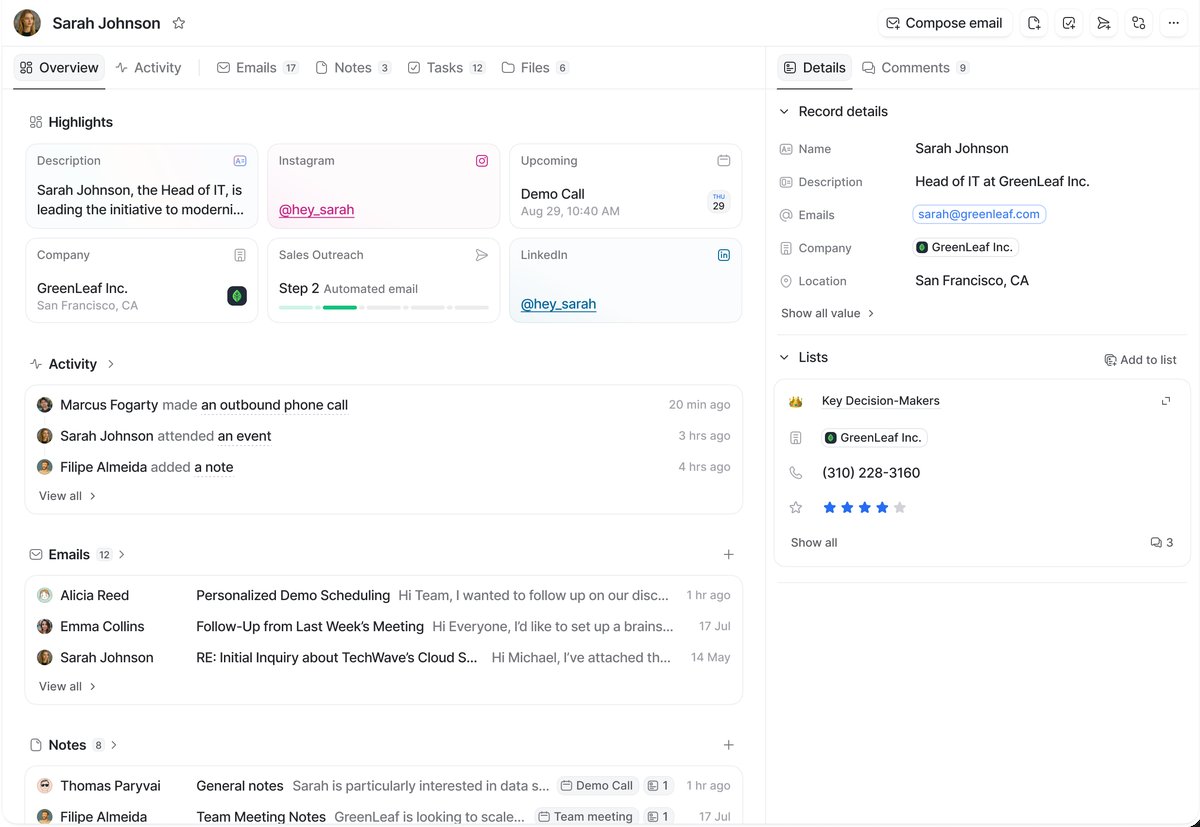 An Attio record page showing auto-enriched company data, activity history, and list memberships.
Map your objects, but don't mirror them
HubSpot gives you a fixed set of standard objects - Contacts, Companies, Deals, Tickets - and you build around them. Custom objects exist but require an Enterprise subscription, and they still sit inside HubSpot's opinionated framework. Properties are how you store data on those objects, and associations define how objects link together.
Attio starts from a different place. You get standard objects (People, Companies, Deals), but you can create custom objects freely on any plan. Want an Investors object, a Funds object, a Portfolio Companies object? You just build them. Attributes replace properties, and relationship attributes replace associations - but with more flexibility in how records connect across objects.
Here's what I typically walk clients through before they start:
Map your objects, but don't mirror them. HubSpot Contacts become People. Companies stay Companies. Deals stay Deals. But take the opportunity to rethink any custom objects or workarounds you've built. That custom property you used to tag Contacts with a deal role? In Attio, that's probably a relationship attribute linking People to Deals with proper context.
Understand how data types translate
Properties become attributes, but the types are different. HubSpot dropdown properties map to select attributes in Attio. HubSpot deal stages map to status attributes on a pipeline. Currency fields, dates, and text translate fairly directly. The one to watch is HubSpot's calculated properties - you'll want to look at Attio's calculated attributes or rollup attributes for the equivalent.
Here is a more complete mapping of common HubSpot property types to their Attio equivalents:
- Single-line text maps to text attributes
- Number maps to number attributes
- Dropdown select maps to select attributes
- Multiple checkboxes maps to multi-select attributes
- Date picker maps to date attributes
- Currency maps to currency attributes (with configurable currency type)
- Checkbox (boolean) maps to checkbox attributes
- Phone number maps to phone number attributes
- Calculated properties need to be rebuilt as calculated attributes or rollup attributes
- Score properties can be replaced with number attributes driven by lead scoring workflows
- Rich text does not have a direct equivalent; use text attributes or notes
One thing that catches people off guard is how Attio handles multi-value fields. In HubSpot, a Contact can have multiple email addresses stored in separate properties (Email, Additional Email). In Attio, email addresses are natively multi-value on the People object. The same applies to phone numbers and domains. This is actually a cleaner model, but you need to handle it correctly during import.
Workflows translate, but the trigger model shifts
Workflows translate, but the trigger model shifts. HubSpot workflows are powerful but tied to its ecosystem. Attio workflows use triggers (record created, attribute changed, stage moved) paired with actions (send email, update record, notify Slack). The logic is similar but you'll likely need to rebuild rather than import.
The biggest difference is in how the two platforms handle enrollment. HubSpot workflows enroll records that match criteria and process them through a sequence. Attio workflows fire when an event occurs. This is an event-driven model rather than a batch model. You don't say "find all contacts where X and do Y." You say "when a contact's X changes to this value, do Y."
For most sales and operations workflows, this is actually a better model because it fires in real time rather than on a polling interval. But if you have HubSpot workflows that periodically scan your database and update records in bulk, you will need to rethink those. Often the answer is a combination of Attio workflows for real-time triggers and the Attio API for batch operations.
I also recommend rebuilding your workflows from scratch rather than trying to replicate them one-for-one. Clients who try to exactly mirror their HubSpot workflow logic in Attio end up with unnecessarily complex automations. Start by asking what outcome each workflow is supposed to produce, then build the simplest Attio workflow that achieves that outcome.
Rethink lists and clean your data
Lists work differently. HubSpot lists are saved filters on Contacts or Companies. Attio lists are more powerful - they can hold records from any object, and you can add list-specific attributes that only exist in the context of that list. This means you can stop overloading your main objects with attributes that only matter in certain views.
This is one of the biggest architectural wins in the migration. In HubSpot, if your sales pipeline needs a "Deal Source" field, that property lives on the Deals object and shows up everywhere, even in contexts where it is irrelevant. In Attio, you can make "Deal Source" a list attribute that only exists on your Sales Pipeline list. Your data model stays clean, and your records don't get cluttered with fields that belong to a specific process.
Clean your data before you move it. Deduplicate contacts, archive dead deals, standardise naming conventions. Attio's enriched attributes will fill in gaps like company size and industry automatically, so don't waste time manually migrating data that Attio will source itself. I cover handling duplicate records in more detail separately.
Build a migration plan with phases
I have seen too many teams try to do the migration in one weekend. The firms I work with that have the smoothest transitions break it into phases:
Phase 1: Design your target data model. Before you touch any data, map out your objects, attributes, lists, and pipelines in Attio. Decide what stays, what gets restructured, and what gets dropped. This is where the real value of the migration happens. Use this step to also think through how you want to design your data model and how it supports your workflows.
Phase 2: Migrate core records. Export your Companies, Contacts, and Deals from HubSpot and import them into Attio. Attio's CSV import handles this well, and the built-in enrichment will fill in a lot of the data you would otherwise need to map manually. Focus on getting the records in with their primary identifiers (domain for companies, email for people) so that Attio can deduplicate and enrich.
Phase 3: Migrate relationships and associations. This is where you connect records together using relationship attributes. HubSpot associations (Contact-to-Company, Deal-to-Contact) need to be recreated in Attio. The API is the most reliable path here, especially for large datasets.
Phase 4: Rebuild workflows and integrations. Rebuild your automations in Attio's workflow builder. Reconnect your email, calendar, and any third-party integrations. If you use Slack for deal notifications, set that up now following the pattern in connecting Attio to Slack.
Phase 5: Run both systems in parallel. For at least one to two weeks, keep both HubSpot and Attio running. Let your team use Attio for new activity while keeping HubSpot as a reference. This gives you a safety net and lets the team build comfort before you fully switch over.
Common mistakes during migration
Trying to replicate every HubSpot property. Most HubSpot workspaces have dozens of properties that nobody uses. The migration is your chance to audit and trim. If a property hasn't been updated in six months, you probably don't need it in Attio.
Ignoring the enrichment overlap. Attio automatically enriches company records with data like employee count, industry, location, and funding. If you spend time manually migrating these fields from HubSpot, you are duplicating effort. Let Attio's enrichment handle what it can and focus your migration effort on proprietary data that only exists in your HubSpot instance.
Not involving the team early enough. A CRM migration that happens in a back room and then gets dropped on the sales team rarely goes well. Involve your users in the data model design phase. Ask them what they actually use, what they wish they had, and what they ignore. This makes the new system feel like theirs rather than something imposed on them. For more on scaling workspace design, see what your workspace should look like at 50 users.
Skipping the reporting rebuild. HubSpot reports don't transfer to Attio. But this is a feature, not a bug. Attio's reporting capabilities are built around its data model, and you can often build better reports once your data is properly structured. Plan for this step explicitly rather than discovering the gap after go-live.
What about integrations?
Most teams running HubSpot have integrations with other tools. The key integrations to plan for:
- Email and calendar: Attio syncs with Gmail and Outlook natively. This usually just works after connecting.
- Enrichment tools: If you use Clay for enrichment, you'll reconnect it to Attio's API. The data flow is often simpler than it was with HubSpot.
- Slack: Attio has a native Slack integration for notifications. See how to set up deal notifications in Slack.
- Zapier and Make: Both support Attio, so most Zaps and scenarios can be recreated.
The firms I've seen get the most out of the migration are the ones who treat it as a redesign, not a copy-paste. If you are evaluating whether Attio is the right fit for your startup in the first place, I cover that decision in what is the best CRM for startups. And if you are migrating from Salesforce instead, the considerations are different enough that I wrote a separate guide on moving from Salesforce to Attio.