What should your Attio workspace look like at 50 users?
By Daniel Hull ·
At 50 users your workspace needs structure that a five-person team never did. The short answer is: lock down who can change object and list configuration, give each team their own lists, and assign clear ownership of workflows.
Roles and permissions
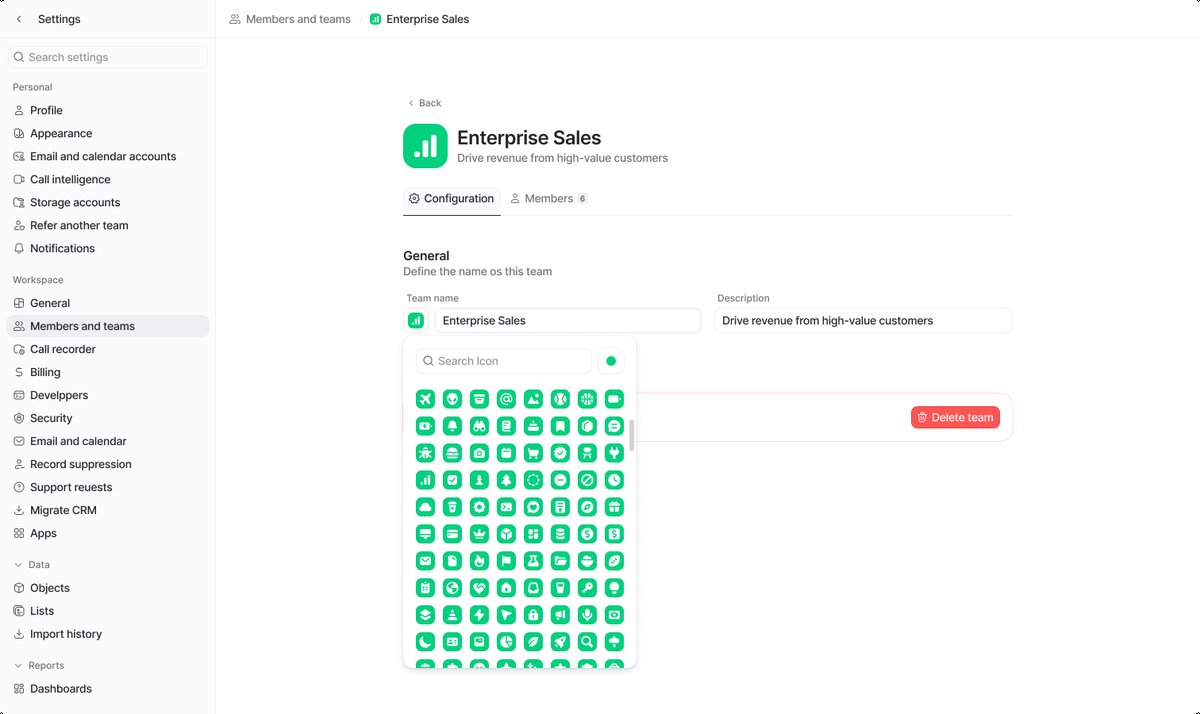 Teams in Attio let you group workspace members and manage permissions at scale.
Attio has two workspace-level roles -- Admin and Member. Admins can manage workspace settings, invite members, handle billing, and view all lists. Members can only work within the lists and views they've been granted access to. At 50 users, you want a small number of admins -- typically your RevOps or CRM lead and one backup. Everyone else should be a member with access scoped to what they actually need.
The temptation is to make team leads admins so they can "fix things quickly." Resist this. Every additional admin is someone who can change object structures, delete attributes, or modify workflows that other teams depend on. I've seen a single well-intentioned admin rename an attribute and break three automations downstream. Keep admin access tight and train your team leads to submit change requests instead.
A good rule of thumb: if your workspace has more than three admins at 50 users, you have too many. Two is ideal. One primary (your CRM admin or RevOps lead) and one backup for when the primary is on vacation or unavailable.
Team-specific lists and access
Lists are where permissions get practical. Each list in Attio has four access levels: Full access, Read and write, Read only, and No access. Full access lets someone modify list settings and manage attributes. Read and write lets them work with records and create views. Read only is exactly what it sounds like. No access hides the list entirely. By default, a new list is only visible to its creator and admins, which is the right starting point.
The pattern I typically recommend is: keep objects shared across the workspace (Companies, People, Deals are everyone's data), but create team-specific lists that filter and present that data for each function. Sales gets a pipeline list with kanban views filtered by rep. Customer success gets a renewals list. Marketing gets an outreach list. Each team has Read and write on their own lists, Read only on adjacent teams' lists, and No access to anything irrelevant. On Attio's Pro plan and above, you can use teams to manage these permissions in groups rather than per-individual.
Here is a concrete permission matrix I use as a starting point for most 50-user workspaces:
Sales team:
- Sales Pipeline list: Read and write
- Customer Success / Renewals list: Read only
- Marketing Outreach list: No access
- All Deals list: Read and write
- Target Accounts list: Read and write
Customer Success team:
- Renewals list: Read and write
- Sales Pipeline list: Read only
- Customer Health list: Read and write
- All Deals list: Read only
Marketing team:
- Outreach list: Read and write
- Sales Pipeline list: Read only
- Event Attendees list: Read and write
- Target Accounts list: Read only
Leadership:
- All lists: Read only (they should observe, not edit)
- Reporting views: Read only
This matrix scales well because it follows a principle: each team owns their operational lists and can observe adjacent teams' data without modifying it. Leadership sees everything but changes nothing directly.
Structuring views within lists
At 50 users, a single view per list is not enough. Different people on the same team need different perspectives on the same data. Attio lets you create multiple views within a list, and this is where you should invest time.
For a sales pipeline list, I typically set up:
- My Deals (kanban): Filtered to the current user's deals. This is each rep's daily working view.
- All Deals (kanban): Unfiltered pipeline view. Used by sales managers in pipeline reviews.
- Closing This Month (table): Filtered to deals with a close date in the current month, sorted by deal value. Used for forecast meetings.
- Stale Deals (table): Filtered to deals that haven't had activity in 14+ days. Used by sales managers to hold reps accountable.
For a customer success list:
- Upcoming Renewals (kanban): Filtered to renewals in the next 90 days. The CS team's primary view.
- At Risk (table): Filtered to accounts with a "Red" or "Yellow" health score. The CS lead's escalation view.
- My Accounts (table): Filtered to the current user's accounts. Each CSM's portfolio view.
Setting up these views takes 30 minutes and saves your team hours of manual filtering every week. The key is that views are saved per list, so everyone on the team benefits from the same structure.
Workflow ownership and governance
Workflows need similar discipline. At 50 users, you'll likely have dozens of automations running -- lead routing, Slack notifications, stage change triggers. Each workflow should have a clear owner, and only admins and workflow creators should be able to edit them. Attio's workflow builder lets you manage workflow access so that members can see an automation exists without being able to break it.
I recommend maintaining a simple workflow registry. This can be a note in Attio, a spreadsheet, or a page in your internal wiki. For each workflow, document:
- Name: What the workflow is called in Attio.
- Owner: Who created it and who is responsible for maintaining it.
- Trigger: What event starts the workflow.
- Actions: What the workflow does (moves records, sends notifications, creates tasks, etc.).
- Dependencies: What other workflows, attributes, or integrations this workflow depends on.
This registry becomes essential when something breaks. At 50 users, workflows interact with each other in ways that are not always obvious. A workflow that routes deals to reps based on territory might conflict with a workflow that reassigns deals based on deal size. Your registry makes these dependencies visible before they cause problems.
I also recommend a naming convention for workflows. Something like "[Team] - [Trigger] - [Action]" works well. Examples: "Sales - Deal Stage Change - Slack Notification," "CS - Renewal 90 Days Out - Move to Upcoming," "Marketing - New Lead - Assign to SDR." When you have 40 workflows, naming conventions are the difference between finding what you need in ten seconds and spending five minutes scrolling.
Data governance at scale
The biggest shift at this scale is moving from "everyone configures everything" to "a small team owns the data model and everyone else operates within it." Resist the temptation to let individual reps add attributes or modify object structures. That's how you end up with fifteen variations of a "Source" field and duplicate record problems. One person should own object architecture, attribute naming conventions, and workflow logic. Everyone else should focus on using the system rather than reshaping it.
Specific governance practices that work at 50 users:
Attribute change requests. When someone needs a new attribute, they submit a request to the CRM admin rather than creating it themselves. The admin evaluates whether the attribute already exists (under a different name), whether it belongs at the object level or list level, and what type it should be. This takes five minutes and prevents months of cleanup later.
Quarterly audits. Once per quarter, your CRM admin should review all attributes, lists, and workflows. Look for unused attributes (if no records have a value populated, the attribute probably doesn't need to exist), redundant lists, and workflows that haven't fired in months. Archive or remove what's not being used.
Onboarding templates. When a new user joins the workspace, they should receive a documented guide covering: which lists to access, which views to use, how to enter data correctly, and who to contact for CRM changes. At five users you can explain this verbally. At 50, you need a document.
Duplicate management. With 50 users creating records, duplicates multiply fast. Set up a weekly process (or a workflow) to identify and merge duplicates. Attio's built-in duplicate detection helps, but it's not a substitute for a regular review.
What changes between 50 and 100 users
If you're at 50 and growing toward 100, start thinking about these before you need them:
- Team-level permissions become essential. Managing permissions per user doesn't scale past 50. Use Attio's teams feature to assign permissions by group. When a new SDR joins, you add them to the "Sales" team and they automatically get the right access to the right lists.
- API integrations multiply. At 100 users, you'll likely have Clay, Slack, and possibly product data integrations all pushing data into Attio. Each integration needs an owner and monitoring.
- Reporting needs formalize. Ad hoc reports give way to dashboards and scheduled reports. Your leadership team will want consistent metrics delivered on a cadence, not one-off views.
- The CRM admin role becomes a job. At 50 users, CRM administration is part of someone's role. At 100, it needs dedicated time. If your CRM admin is also your VP of Revenue Operations, they're going to drop one of those responsibilities. Plan accordingly.
If you're approaching this size and your workspace still feels like the early days -- no list permissions set, workflows scattered across creators, no naming conventions -- that's the moment to pause and restructure before the mess compounds. The cost of restructuring at 50 users is a couple of days. The cost of restructuring at 100 is a couple of weeks. Build the foundation now while the work is manageable, and your future team will thank you.