How should you use relationship attributes in Attio?
By Daniel Hull ·
Relationship attributes are how records in different objects reference each other. A deal linked to a company, a person linked to a deal, these connections are what turn a flat database into something that actually reflects how your business works.
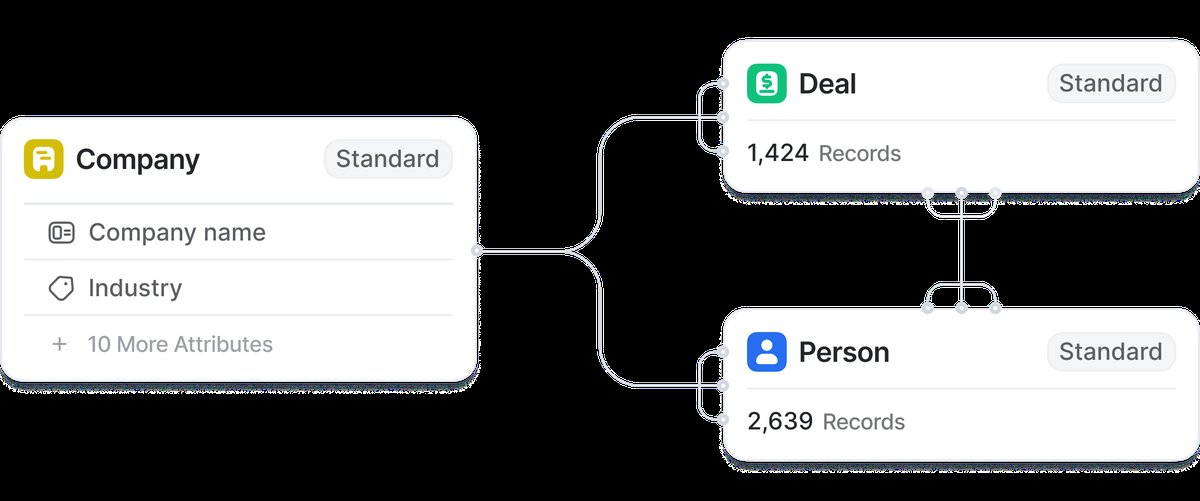 Relationship attributes in Attio link records across objects, creating a connected graph of your data.
How relationships work in Attio
The key thing to understand is that relationship attributes are bidirectional. When you link a deal to a company, that company's record automatically shows the deal on its side. You don't need to update both records manually, and you never end up with orphaned references. One action, both sides updated.
This bidirectionality is what makes Attio's data model so powerful for connected businesses. In a spreadsheet or a flat CRM, you'd track "Company Name" as a text field on a deal record. That means every deal for the same company stores a separate copy of that company name, and if the company's name changes, you have to update every deal manually. With a relationship attribute, you store the connection once. The company's name, industry, size, and every other attribute flows through automatically wherever that relationship is referenced.
Attio gives you system relationship attributes out of the box. Company linked to People (the "Team" attribute), Deals linked to Companies, Deals linked to People. These cover the most common patterns and they're available on every plan. Where it gets interesting is when you create custom relationship attributes on Pro or Enterprise to model relationships specific to your business.
System relationships are pre-configured and can't be deleted, which makes them a reliable foundation to build on. Custom relationships give you the flexibility to model anything your business needs, from linking deals to partners, connecting projects to deliverables, or tracking co-investment relationships between funds and companies.
Getting the relationship types right
The relationship types matter more than people realise. A company has many deals, but each deal typically belongs to one company. That's a one-to-many relationship. People associated with deals is usually many-to-many, because the same person might be involved in multiple deals, and a single deal often has several stakeholders. Getting this right at the start saves you from confusing data later. This is especially important when you're deciding whether to create a custom object to hold those relationships.
Here's a breakdown of the relationship types and when to use each:
One-to-many. Each deal belongs to one company, but a company can have many deals. Each person works at one company (typically), but a company has many team members. Use this when the relationship has a clear "parent" and "child" direction.
Many-to-many. A deal can involve multiple people (champion, decision maker, legal contact), and a person can be involved in multiple deals. Partners can work with multiple companies, and companies can work with multiple partners. Use this when both sides of the relationship can have multiple connections.
Self-referential. Records in the same object can link to each other. A deal can be linked to a follow-on deal. A company can have parent/subsidiary relationships. These are less common but extremely useful for modeling hierarchies or sequences.
What I tell clients is to think about the relationship from both sides before creating it. If you link Deals to People, ask: from the deal record, should I see one person or many? From the person record, should I see one deal or many? The answers determine whether you need one-to-many or many-to-many.
A common mistake is defaulting to one-to-many when many-to-many is needed. For example, if you set up Deals-to-People as one-to-many (each deal has one contact), you'll quickly find that most deals have at least three or four stakeholders. Changing a relationship type after you've built views, automations, and reports on top of it is disruptive. Get it right early.
Avoiding data duplication
I typically recommend relationship attributes over duplicating data across objects. If you find yourself copying a company's industry or employee count onto every deal record, stop. Link the deal to the company via a relationship attribute instead, and then pull those company attributes into your deal views through the relationship. Attio lets you display, filter, and sort by attributes on linked records, so you get all the visibility without maintaining the same data in two places. You can also use calculated attributes to roll up data across these linked records.
The no-duplication principle is one of the most important concepts I emphasise with new Attio users. Here's why it matters so much:
Data accuracy. When a company changes its name, gets acquired, or updates its headcount, you update one record. Every deal, person, and project linked to that company instantly reflects the change. With duplicated data, you'd need to find and update every copy manually.
Reporting reliability. If you're grouping deals by company industry, the industry value should come from one source (the company record), not from however many deal records reference that company. Duplicated data drifts over time, which makes your reports unreliable.
Reduced data entry. Your sales reps shouldn't be typing "Financial Services" into every deal record for the same bank. The relationship to the company record provides that context automatically.
The practical rule I use: if a piece of information describes the company, it belongs on the company record and should be accessed through a relationship. If it describes the deal (value, stage, close date, owner), it belongs on the deal record. If it describes the relationship between a deal and a company (primary contact at this company for this deal), it can live as a relationship-level attribute or on a junction record.
Practical patterns for your workspace
A practical pattern I use with clients: link deals to companies (one-to-many), link deals to people with a role context so you know who's the decision maker versus the champion (many-to-many), and if you have a custom object like Projects or Subscriptions, link those to the relevant company and deal records. This gives you a complete picture on any record. Open the company and see all deals, all people, all projects, without navigating away. I cover how this comes together for building a GTM engine in a separate post.
Here are the relationship patterns I set up most frequently:
Sales workspace. Deals linked to Companies (many-to-one). Deals linked to People with roles (many-to-many). Companies linked to People via the system Team attribute. This gives every deal record a full view of the account and every company record a full view of the pipeline.
VC workspace. Deals linked to Companies (many-to-one). Deals linked to People as founders, board members, and co-investors (many-to-many). Funds linked to Deals for tracking which fund made each investment. People linked across deal and LP contexts so network overlap surfaces automatically.
Agency / services workspace. Projects linked to Companies (many-to-one). Projects linked to People as client contacts and internal team members (many-to-many). Deals linked to Projects so you can trace revenue from sale through delivery.
SaaS workspace. Subscriptions linked to Companies (many-to-one). Renewals tracked as status on the Subscription records. Product usage data linked to Companies via the product data integration. Support tickets (if tracked in Attio) linked to both the Company and the Subscription.
Using relationships in views and reports
One of the most useful features of relationship attributes is that you can display, filter, and sort by attributes on linked records in any view. This means you can build a Deals list view that shows the linked company's industry, size, and owner without adding those attributes to the Deals object.
This is particularly powerful for building reports. You can group deals by the linked company's industry (pulled through the relationship) and see pipeline value by industry without maintaining an industry field on deals. You can filter deals to only show those linked to companies above a certain employee count. You can sort your pipeline by the linked company's last interaction date to prioritise accounts that are going cold.
For teams using lead scoring, relationship attributes mean your scoring logic can factor in company-level data (size, industry, product usage) alongside deal-level data (stage, value, activity) without duplicating any of it.
Relationship attributes and workflows
Relationships also work in workflows. You can trigger a workflow based on a change to a linked record, or you can use condition blocks that check attributes on linked records. For example, you could build a workflow that triggers when a deal moves to "Closed Won" and then updates a status attribute on the linked company record to "Customer." This keeps your company records in sync with your deal outcomes without manual updates.
Another common pattern: when a new deal is created, check the linked company for existing deals. If the company already has a closed-won deal, tag the new deal as "Expansion" rather than "New Business." This kind of conditional logic based on relationship data is what makes deal routing and pipeline management genuinely intelligent.
What to watch out for
The one thing to watch is that attributes shown through multi-value relationships are read-only in views. You can see them and filter by them, but to edit you need to navigate to the source record. That's a minor friction point, but it's worth knowing before you design your workspace around deeply nested relationship chains. The Attio Help Center has detailed documentation on the specific behaviour of each relationship type.
A few more things I've learned from implementing relationship-heavy workspaces:
Don't chain relationships too deeply. If you need to go Deal to Company to Fund to LP to get the data you want, the view performance and usability degrade. Keep your most-used data within one relationship hop of where you need it. If you regularly need data from two hops away, consider adding a direct relationship or using a workflow to copy the value.
Document your relationship model. When your workspace has more than three custom objects, draw a diagram showing how they connect. New team members need this to understand the workspace, and you'll need it yourself when planning changes six months from now. I cover this in how to design your Attio data model.
Clean up orphaned relationships. When you delete a record, its relationship references are removed from linked records. But if you're bulk-importing data, it's possible to create records with relationship attributes that point to records that don't exist yet (or that have been deleted). Periodically check for records with empty relationship fields that should have connections, and use duplicate detection to catch records that should be merged.
Start simple, add relationships as needed. Your initial workspace might only need Deal-to-Company and the system People-to-Company link. That's fine. Add more relationships when you have a concrete use case, not because the data model diagram looks elegant. Every relationship you add is one more thing for your team to maintain.