How do you set up lead scoring in Attio?
By Daniel Hull ·
The simplest way to build lead scoring in Attio is to combine a number attribute with workflows that increment it based on signals, then use that score to trigger stage changes or notifications.
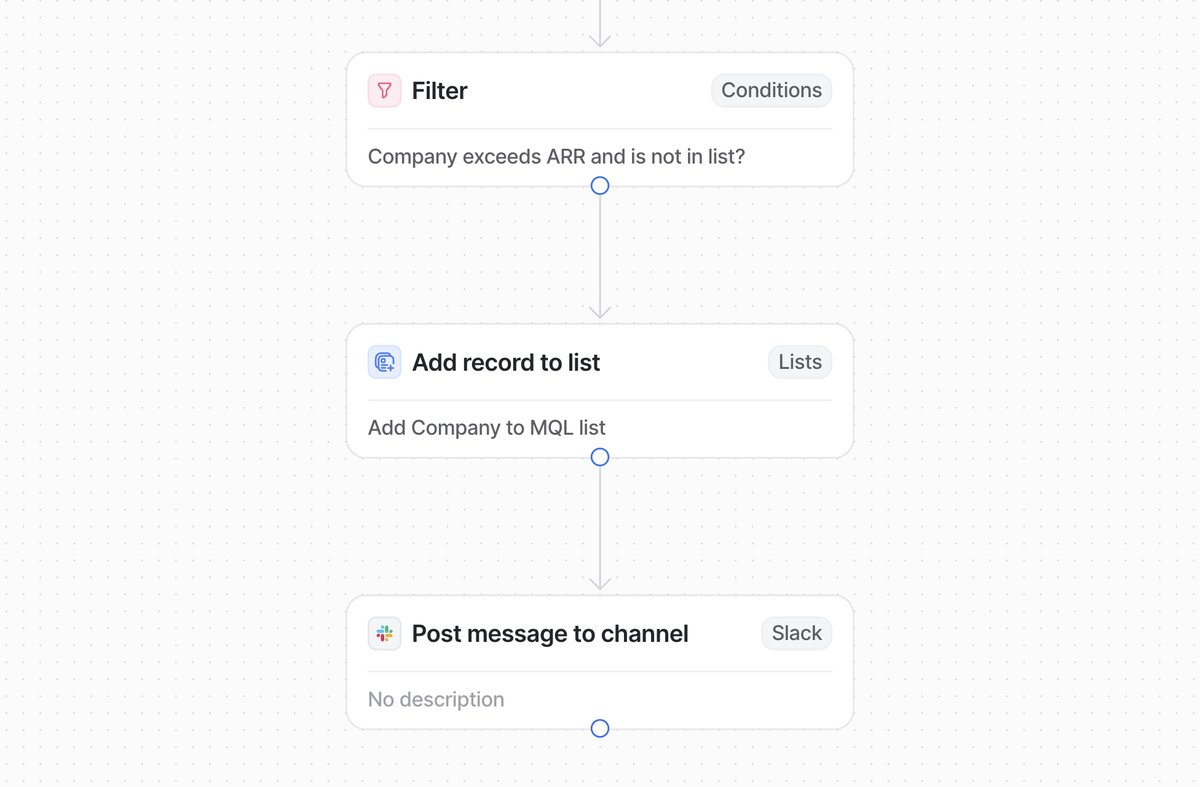 An Attio workflow that scores leads based on attribute changes and sends MQL alerts to Slack.
Add a lead score attribute
Start by adding a number attribute called something like "Lead Score" to whatever object holds your leads - whether that's People, Companies, or a custom Leads object. This is your single source of truth for qualification. It should live on the record itself, not buried in a list attribute, so it's visible across views and usable in reporting.
Why a number attribute and not a rating or select? Because number attributes give you the most flexibility. You can increment and decrement them precisely, set thresholds at any level, and use them in calculated attributes and rollup formulas. A rating attribute caps at 5, which limits your scoring range. A select attribute like "Hot/Warm/Cold" is useful as a display layer but does not give you the granularity to differentiate between leads.
I also recommend adding a companion select attribute called something like "Lead Status" with options like "New," "MQL," "SQL," and "Disqualified." This gives you a human-readable status that workflows can set based on the score, and it works better in pipeline views and reports than a raw number.
Build scoring workflows
Next, set up workflows that adjust the score. Attio workflows can trigger on record changes, so when a lead's attributes update - company size populated, email opened, a relationship attribute linked to a relevant deal - you can fire a workflow that increments the score. The pattern is straightforward: trigger on the change, use a conditional to check what changed, then update the number attribute accordingly.
Here is a concrete example of a scoring workflow:
Trigger: Attribute changed on Companies object Condition: Check which attribute changed Actions:
- If "Employee Count" is populated and above 50: add 10 points
- If "Industry" matches one of your target verticals: add 15 points
- If "Funding Raised" is above $5M: add 10 points
- If a meeting is logged: add 20 points
- If an email reply is received: add 15 points
- If the record has been inactive for 30+ days: subtract 10 points
Each of these is a separate workflow (or a single workflow with branching conditions, depending on your preference). The workflows accumulate scores over time, giving you a composite picture of each lead's fit and engagement.
Design your scoring model
The scoring model itself is where you need to be opinionated. I typically recommend clients start with two categories: fit signals and engagement signals. Fit signals are firmographic - employee count above a threshold, industry match, funding stage. Engagement signals are behavioural - replied to a sequence, attended a meeting, visited pricing. Weight fit signals higher early on, because a perfect-fit company that hasn't engaged yet is still more valuable than a poor-fit company clicking every email.
Fit signals (who they are)
Fit signals tell you whether this lead matches your ideal customer profile. They are static or semi-static attributes that describe the company or person. Common fit signals include:
- Company size (employee count in your target range): +10 to +20 points
- Industry match (in one of your target verticals): +10 to +15 points
- Funding stage (Series A or later, or whatever your threshold is): +10 points
- Geography (in a market you serve): +5 to +10 points
- Tech stack (uses tools that indicate fit, often sourced from Clay enrichment): +10 to +15 points
- Job title of contact (decision-maker vs individual contributor): +5 to +15 points
Engagement signals (what they do)
Engagement signals tell you whether this lead is actively interested. They change over time and indicate buying intent:
- Email reply received: +15 points
- Meeting booked or attended: +20 to +25 points
- Email opened (multiple times): +5 points
- Clicked link in email: +10 points
- Visited pricing page: +15 points (if you track this via product data, see connecting Attio to your product data)
- Downloaded content: +10 points
- Referred by existing customer: +20 points
Negative signals (score decay)
Scoring is not just about adding points. You also need to subtract points for negative signals:
- Email bounced: -20 points
- Unsubscribed: -30 points (or disqualify immediately)
- No activity in 30 days: -10 points
- Marked as "not a fit" by a rep: -50 points or disqualify
- Company went through layoffs or downsized: -15 points
Score decay is important. A lead that scored high six months ago but has gone silent is not the same as a lead that scored high last week. Build workflows that periodically check for inactivity and decrement scores accordingly.
Using AI classification as an alternative
Where Attio gets interesting for scoring is the AI classify action in workflows. Rather than building elaborate conditional logic to score based on dozens of attributes, you can use AI to classify a record against your ICP criteria and output a tier or score. Give it a clear prompt - "Evaluate this company against our ICP: B2B SaaS, 50-500 employees, Series A or later, based in US or UK" - and use the classification output to set your score or a select attribute like "ICP Fit" with Tier 1, 2, and 3 options.
The AI approach works best when your qualification criteria involve nuance that is hard to express as simple rules. For example, "this company seems like they are in a growth phase based on their hiring patterns, product launches, and funding timeline" is a judgment that AI handles well but that would require a dozen conditional branches to approximate with rules.
That said, I recommend using rules-based scoring for signals that are clear-cut (employee count thresholds, industry matches) and AI classification for signals that require interpretation (ICP fit assessment, engagement quality). The two approaches complement each other. Use the rules-based score as your quantitative baseline and the AI classification as a qualitative overlay.
Wire up downstream actions
Once scores are flowing, wire up the downstream actions. A workflow triggered when Lead Score crosses your MQL threshold can automatically update a status attribute to move the record into a qualified stage, create a task for the assigned rep, or send a Slack notification to the sales channel. Keep it to one or two notifications at most - over-alerting kills adoption faster than no alerting.
Here is the full downstream workflow I typically build:
- Score crosses MQL threshold (e.g., 50 points). Update the Lead Status select attribute to "MQL." Send a Slack notification to the sales channel. Create a task for the assigned owner with a deadline of 24 hours.
- Score crosses SQL threshold (e.g., 80 points). Update Lead Status to "SQL." If the lead is not already in the sales pipeline, add it to the pipeline list and set the stage to "Discovery." Notify the AE via Slack DM.
- Score drops below a disqualification threshold. Update Lead Status to "Nurture" or "Disqualified" depending on the reason. Remove the lead from the active pipeline if applicable.
This creates a system where leads automatically flow through your qualification process based on real signals rather than manual review. The team focuses their attention on leads that the system has already validated.
Common mistakes with lead scoring
Overcomplicating the model. The most common mistake is building a scoring model with 30+ signals before validating that any of them predict conversion. Start with five or six signals that you believe are most predictive, run the model for a month, and then check whether high-scoring leads actually convert at a higher rate than low-scoring ones. Add complexity only when you have evidence that it improves accuracy.
Not calibrating thresholds. Setting your MQL threshold at 50 points means nothing if you haven't tested what a 50-point lead actually looks like. After your scoring model has been running for a few weeks, pull a list of leads at various score levels and ask your sales team: "Would you want to talk to this lead?" Adjust the threshold until the answer is consistently "yes" for leads above it and "probably not" for leads below it.
Ignoring score decay. A lead that scored 80 points three months ago is not the same as one that scored 80 points today. Without decay, your pipeline fills up with stale leads that scored high historically but are no longer engaged. Build in automatic score reduction for inactivity.
Scoring everything equally. Not all signals are created equal. A meeting attended is worth far more than an email opened. Weight your signals based on how strongly they correlate with actual conversions. If you don't have conversion data yet, use your sales team's intuition as a starting point and refine as data comes in.
Using lead scoring without a clear handoff process. Scores are only useful if they trigger action. If your MQL threshold fires but nobody follows up within 24 hours, the scoring system is creating noise without value. Build the downstream workflow before you turn on scoring, and make sure someone owns the handoff. For more on building a complete GTM engine, the handoff process is one of the most critical pieces.
Reporting on your scoring model
Once scoring is live, you need to measure whether it is working. Build a report in Attio that tracks:
- How many leads cross the MQL threshold per week
- Conversion rate from MQL to SQL
- Conversion rate from SQL to Closed Won
- Average score of leads that convert vs leads that don't
- Time from MQL to first sales touch
These metrics tell you whether your scoring model is identifying the right leads. If MQL-to-SQL conversion is low, your threshold is too lenient or your fit signals need recalibrating. If it is very high but volume is too low, your threshold is too strict.
Start simple. A basic scoring model with five or six signals will outperform an elaborate one that nobody maintains.