What's the best way to handle duplicate records in Attio?
By Daniel Hull ·
Prevention, first and foremost. Attio gives you structural tools to stop duplicates before they happen, and they're far easier to set up than any cleanup effort after the fact.
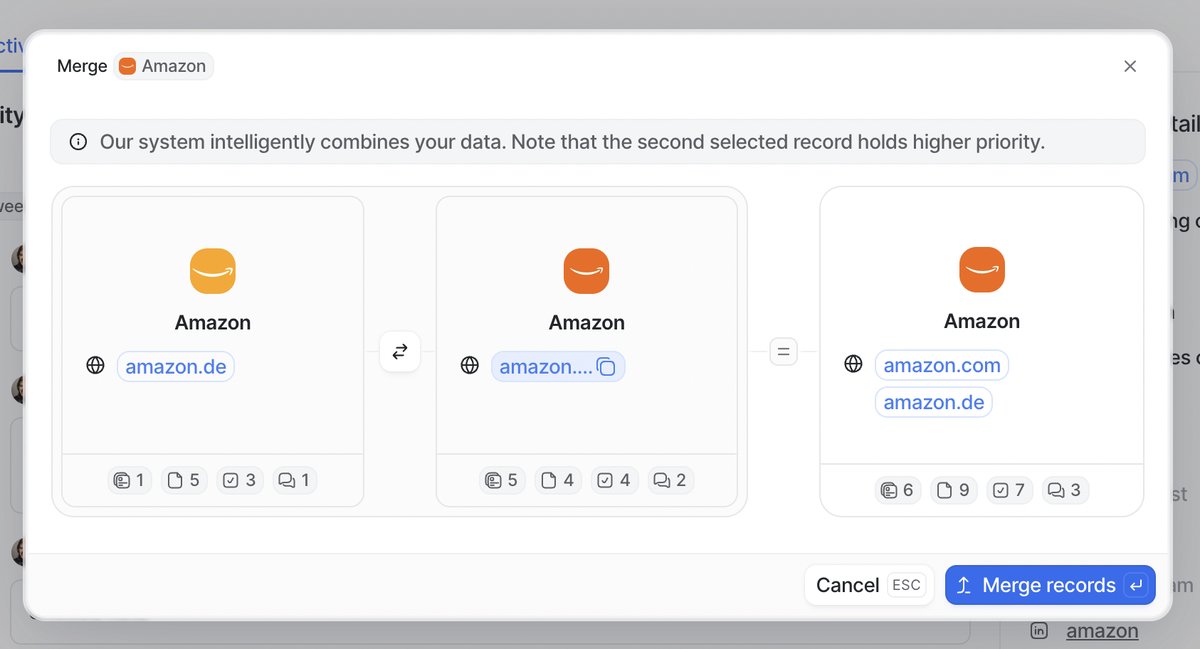 Attio's merge tool lets you compare and consolidate duplicate records side by side.
Unique attributes are your first defence
The foundation is unique attributes. Attio treats domains on companies and email addresses on people as unique identifiers by default. If you try to create a company with a domain that already exists, Attio will match it to the existing record rather than creating a duplicate. Same with people and email addresses. This is the single most important defence against duplicates, and it works automatically as long as you're capturing domains and emails consistently.
Attio's enrichment reinforces this. When you add a company domain, Attio enriches the record with firmographic data and standardises the entry. This means "acme.com" and "www.acme.com" resolve to the same company rather than spawning two records. For people, email addresses serve the same anchoring function.
Where duplicates tend to creep in is when records are created without these identifiers. Someone adds a company by name only, without a domain. Another person does the same thing a week later. Now you have two "Acme Corp" records with no domain to match on. The fix is cultural as much as technical: establish a convention that every company record needs a domain and every person record needs an email address. No exceptions.
How duplicates actually get created
Understanding how duplicates enter your workspace is the first step to stopping them. In my experience, there are five primary sources:
Manual entry without identifiers. A rep creates a company record by typing just the name, skipping the domain field. Another rep does the same thing for the same company next week. Attio has no way to match them because there is no unique identifier. This is the most common source and the easiest to fix through process and training.
Bulk imports with dirty data. When you import data from a CSV or another CRM, the imported data may contain duplicates that your source system tolerated. It may also contain records that overlap with records already in Attio. If you import without deduplicating first, you multiply the problem.
Integration-created records. Tools like Clay, enrichment services, or product data integrations can create records in Attio. If these tools do not check for existing records before creating new ones, or if they use a different identifier than what Attio uses, you get duplicates. Always configure integrations to match on domain (for companies) or email (for people) before creating new records.
Name variations and subsidiaries. "Acme Corp," "Acme Corporation," "Acme Inc." -- these are the same company, but without a shared domain, Attio treats them as distinct. Similarly, a parent company and its subsidiary might share personnel but have different domains. Decide upfront how you want to handle corporate hierarchies and stick to the convention.
People with multiple email addresses. A contact might appear with their work email in one record and their personal email in another. Attio's People records support multiple email addresses, but if the second email is added as a new record instead of appended to the existing one, you get a duplicate.
Cleaning up existing duplicates
For existing duplicates, the approach I typically recommend is building a list filtered to surface likely matches. Filter companies to show records sharing the same domain, or people sharing the same email address. You can also sort by name and scan for near-matches. Once identified, you merge the records to consolidate the data into a single entry.
Here is a step-by-step approach for a thorough cleanup:
Step 1: Audit your domain and email coverage. Filter your Companies object to show records where the domain attribute is empty. Do the same for People with no email address. These are your highest-risk records for duplication because Attio cannot automatically deduplicate them. Prioritize filling in the missing identifiers.
Step 2: Search for exact duplicates. Sort companies by domain and look for records that share the same domain. These are definitive duplicates and can be merged immediately. Do the same for People sorted by email address.
Step 3: Search for likely duplicates. Sort companies by name and scan for near-matches. "Acme Corp" and "Acme Corporation" are probably the same company. This step requires manual judgment, but it is worth doing at least once to establish a clean baseline.
Step 4: Merge records. Attio's merge tool lets you select two records and combine them. You choose which attribute values to keep from each record, and Attio consolidates all associated records (notes, relationships, list entries) onto the surviving record. This is non-destructive in the sense that data from both records is preserved on the merged result.
Step 5: Establish ongoing monitoring. After the initial cleanup, set a recurring calendar reminder to scan for duplicates monthly. The smaller the cleanup batch, the less painful it is.
Workflows for ongoing hygiene
Workflows can help with ongoing hygiene. You can set up a workflow using Attio's workflow builder that triggers when a new record is created without a domain or email address, flagging it for review or assigning a task to fill in the missing identifier. This catches the gap before it becomes a duplicate problem.
Here are the specific workflows I recommend:
Missing identifier alert. When a Company record is created and the domain attribute is empty, trigger a workflow that creates a task assigned to the record creator: "Add domain for [Company Name]." Set a deadline of 24 hours. The same pattern works for People records missing email addresses.
Duplicate domain check. This is more advanced, but you can build a workflow that fires when a Company record is updated with a domain and checks (via the API or a webhook) whether another record with that domain already exists. If it does, send a notification to the workspace admin to merge the records.
Import hygiene gate. Before any bulk import, run the import file through a deduplication script that checks domains and emails against existing Attio records. This is especially important when you are bringing data in from Clay, Salesforce, or HubSpot. Cleaning before import is always cheaper than cleaning after.
Building a data quality culture
The hardest part of deduplication is not technical. It is behavioral. Your team needs to internalize a few habits:
Always search before creating. Before adding a new company or person, search for them first. Attio's search is fast and matches on name, domain, email, and other indexed attributes. A five-second search saves a fifteen-minute cleanup later.
Always add identifiers. Every company gets a domain. Every person gets an email address. Make this a non-negotiable part of your team's CRM workflow. If someone does not have an email address yet, note that on the record but still create it with whatever identifying information you have.
Merge immediately when found. When a rep notices a duplicate, they should merge it right away rather than leaving it for "later." Later never comes, and in the meantime, other team members might add notes or activity to the wrong record, making the eventual merge messier.
Assign a data steward. In teams with more than ten CRM users, designate someone (typically an ops person) as the data steward. They do a monthly duplicate scan, enforce identifier requirements, and handle edge cases like corporate hierarchies and name changes. This role does not need to be a full-time job, but it needs to be someone's explicit responsibility.
Handling edge cases
Some duplicate scenarios do not have clean answers. Here is how I handle the most common ones:
Parent companies and subsidiaries. If "Acme Inc." and "Acme Labs" are separate business units with different domains, they are separate companies in Attio. Use relationship attributes to link them (e.g., a "Parent Company" relationship) rather than merging them. This preserves the distinction while making the connection visible.
People who change companies. When a contact moves from Company A to Company B, update their company association and email address on the existing Person record. Do not create a new Person record for their new role. Attio's multiselect email attribute lets you keep both the old and new email addresses, so the record remains matchable by either.
Acquired companies. When Company A acquires Company B, you have a choice: merge the Company records (if you want all historical deals and notes consolidated) or keep them separate and add a relationship. The right answer depends on how your team will reference the data going forward. If everyone will call it "Company A" from now on, merge. If the acquired entity retains its own identity and deals, keep them separate with a relationship.
If you're migrating data into Attio from another CRM, clean your data before import. Deduplicate your export file using domains and emails as keys, standardise formatting, and remove records that lack identifiers entirely. Migration is the single biggest source of duplicate contamination, and it's much harder to fix once the records are in your workspace. If you're coming from Affinity specifically, check out my guide on migrating from Affinity to Attio.
The test I use with clients is simple: can you search for any company or person and get exactly one result? If the answer is yes, your data hygiene is working. If you're regularly seeing two or three entries for the same entity, it's time to enforce identifiers and do a cleanup pass. This matters even more when you're pushing enriched data from Clay into Attio, since duplicate records mean duplicate enrichment costs and conflicting data. And as your workspace grows toward 50 users, data quality becomes the difference between a CRM your team trusts and one they work around.