How should you use calculated attributes in Attio?
By Daniel Hull ·
Calculated attributes let Attio derive values automatically from related records or existing data on a record. Instead of manually updating a "Total Pipeline Value" field on a company, you set it up once and Attio keeps it current as deals move and values change.
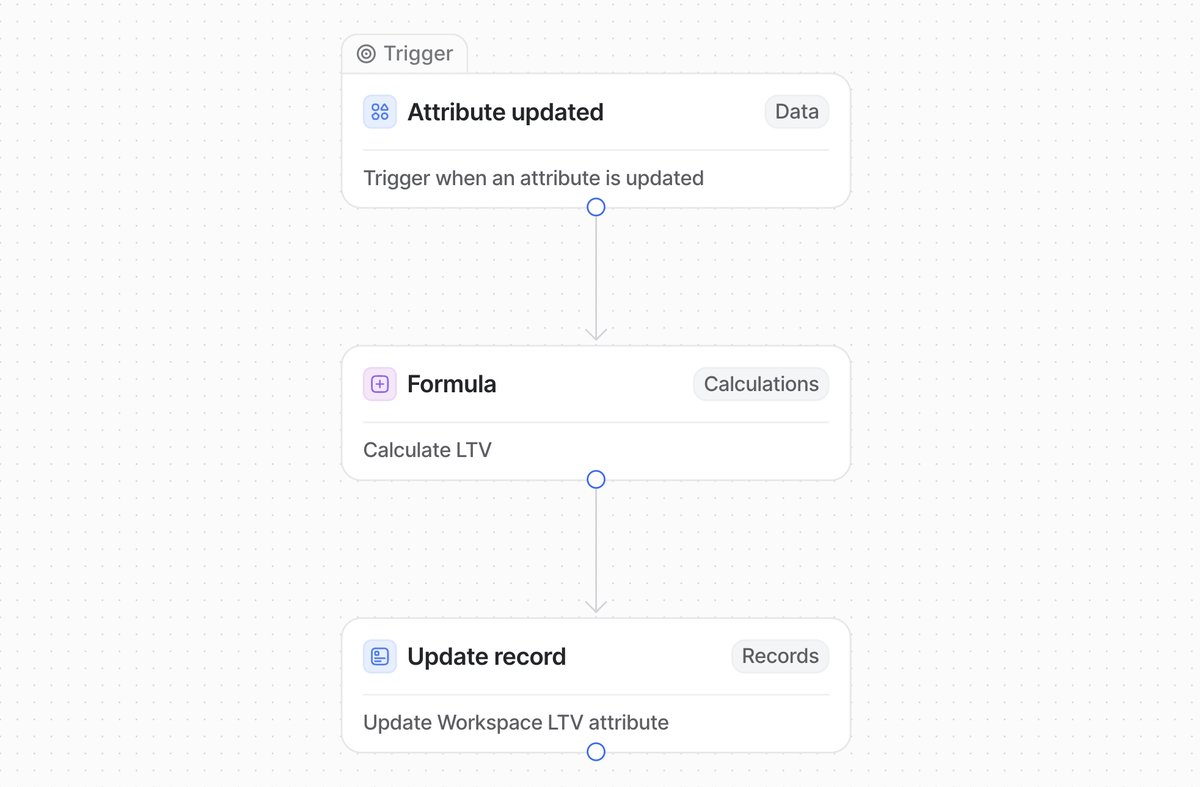 A workflow in Attio that calculates LTV from attribute data and writes it back to the record.
Rollup attributes and aggregation
The most common type is a rollup attribute. These aggregate data across related records using a relationship attribute as the link. If your Deals object has a currency attribute for deal value and a relationship attribute linking each deal to a company, you can create a rollup on Companies that sums the deal values across all linked deals. That number updates automatically whenever a deal is added, removed, or its value changes.
Rollups support several aggregation types beyond sum. Count gives you the number of related records (how many deals are linked to this company). Average, minimum, and maximum work as you'd expect. I find count and sum cover about 80% of what clients need.
Setting up a rollup attribute follows a straightforward pattern:
- Make sure you have a relationship attribute linking the two objects (for example, Deals linked to Companies)
- On the target object (Companies), create a new attribute and select the rollup type
- Choose the relationship to aggregate across (Deals)
- Select the attribute on the related object to aggregate (Deal Value)
- Pick the aggregation function (sum, count, average, min, max)
The result is a read-only attribute that stays current without any manual intervention. What I tell clients is that every number they're currently calculating in a spreadsheet is a candidate for a rollup attribute.
System-level calculated attributes
Beyond rollups, Attio also calculates certain attributes automatically at the system level. Interaction attributes track things like first email interaction, last calendar interaction, and next interaction for every company and person record. Connection strength scores how closely your team is connected to a record based on email and calendar activity. These are read-only and update continuously without any setup on your part.
These system attributes are underappreciated. Connection strength in particular is useful for identifying which accounts have strong team relationships and which are going cold. I recommend creating a saved view sorted by connection strength (ascending) to surface the accounts where your team is least connected. That's your "at risk" list, and it updates itself.
The interaction attributes also feed into Attio's AI features, giving the AI context about communication patterns when generating summaries or suggestions. The richer your email and calendar integration, the more useful these system attributes become.
Building formulas with workflows
While Attio doesn't have a traditional formula builder like a spreadsheet, you can use workflows to create formula-driven attributes. The pattern is:
- Set up a workflow that triggers when relevant attributes change
- Use a formula block within the workflow to perform the calculation
- Use an "Update record" action to write the result to an attribute on the record
This approach is how most teams build custom scoring, weighted values, or any calculation that combines multiple attributes. For example, you might calculate a deal's weighted pipeline value by multiplying the deal amount by the probability percentage associated with each stage.
This is more setup than a native rollup, but it's flexible. You can combine attributes from the record itself, from related records, and even use conditional logic in the formula. The tradeoff is that these values update when the workflow runs rather than in real time, so there's a slight delay after changes.
Practical use cases
The practical use cases that come up most often in my work:
Total pipeline value per company. A sum rollup of deal values gives your team instant visibility into how much revenue is in play with each account, without anyone manually adding numbers. This pairs well with capturing deal values on a pipeline. When I set this up for clients, I usually create two rollups: one for total pipeline value (all open deals) and one for total won revenue (closed-won deals only, filtered by status). The comparison between these two numbers tells you a lot about an account's potential versus its actual contribution.
Stale deal detection. If you track a "Last Activity" date on deals, a rollup showing the oldest last activity date across a company's deals immediately surfaces accounts that are going cold. Pair this with a Slack notification workflow that fires when the last activity date exceeds a threshold, and you have an automatic early warning system for stale deals.
Engagement scoring. A count of interactions in a given period, combined with connection strength, gives you a lightweight engagement score without building a separate scoring model. This is especially useful for account-based teams who need to know which target accounts are warming up and which are going quiet.
Rep workload balancing. A count rollup of open deals per owner, surfaced on a list or report, makes it obvious when one rep is overloaded. I've seen teams where one AE had 40 open deals and another had 12, but nobody noticed until we added this rollup. Use it as an input to your deal routing logic to distribute new deals more evenly.
Customer health monitoring. For teams tracking renewals, a combination of rollups can surface renewal risk automatically. Sum the total contract value, track the next renewal date, and combine that with interaction data to flag accounts that have high revenue but low recent engagement.
Fund deployment tracking. For VC funds, a sum rollup of check sizes on a Funds object shows total deployed capital that updates with each new investment. A count rollup shows portfolio size. These numbers feed directly into LP reporting without anyone maintaining a separate spreadsheet.
Where to use rollups versus workflows
The decision between a rollup attribute and a workflow-based calculation comes down to complexity:
Use rollups when you need a simple aggregation of a single attribute across related records. Sum, count, average, min, and max are all covered. Rollups are real-time, require no maintenance, and are the right choice for straightforward aggregations.
Use workflows when you need to combine multiple attributes, apply conditional logic, or perform calculations that go beyond simple aggregation. Weighted pipeline values, custom scoring formulas, and multi-step calculations all require the workflow approach.
A common pattern is to use both together. Roll up raw data with rollup attributes, then use a workflow to combine those rolled-up values into a composite metric. For example, roll up total pipeline value and deal count as separate rollup attributes, then use a workflow to calculate average deal size from those two numbers.
Common mistakes with calculated attributes
Building calculated attributes before the source data is reliable. A sum rollup of deal values is useless if half your deals don't have a value filled in. I always audit the completeness of source attributes before setting up calculations. If fewer than 80% of records have the source attribute populated, fix that first.
Creating too many rollups too early. Each calculated attribute adds cognitive load to your workspace. Start with the three or four calculations your team actually needs for decision-making, and add more only when someone asks. I've seen workspaces with 15 rollup attributes on Companies where the team only ever looks at two of them.
Not documenting what the calculation does. Attio lets you add descriptions to attributes. Use this. Six months from now, nobody will remember whether "Pipeline Score" is a sum, an average, or a workflow-calculated composite. A one-line description prevents confusion and makes onboarding new team members easier.
Ignoring the relationship chain. Rollup attributes only work across direct relationships. If you want to aggregate data that's two relationships deep (for example, summing deal values from Companies linked to a Fund), you'll need a workflow to bridge the gap. Plan your data model with this constraint in mind. I cover this in more detail in my guide on designing your Attio data model.
Keep your data clean first
The thing I emphasise with clients is that calculated attributes only work well when the underlying data is clean. A sum rollup of deal values is useless if half your deals don't have a value filled in. Get the foundational attributes right first, then layer on calculations. The payoff is that your reporting becomes automatic and your team spends less time on manual data entry. If you're tracking renewals, calculated attributes are especially useful for surfacing revenue at risk. See how to track customer renewals in Attio for specific patterns.
Before adding any calculated attribute, ask yourself: is the source data being entered consistently? If not, the calculated attribute will give you a false sense of accuracy. Fix the data entry problem first (with required fields, automations, or enrichment tools like Clay), then layer on the calculations.