What's the difference between list attributes and object attributes?
By Daniel Hull ·
Object attributes live on every record of an object. List attributes only exist in the context of a specific list. That's the core distinction, and getting it right is one of the most important decisions in your Attio data model.
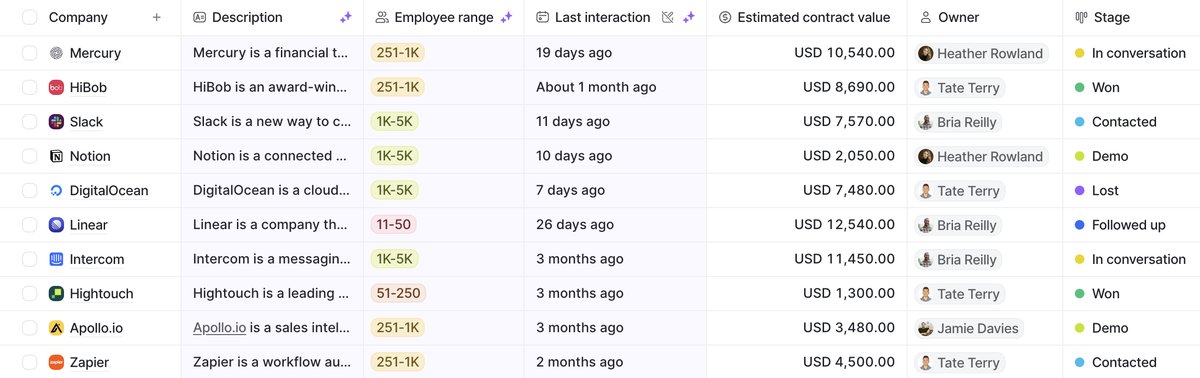 Object attributes like company name persist across views, while list attributes like stage are scoped to each pipeline.
Object attributes: universal truths
An object attribute (like "Founding Year" on Companies or "LinkedIn URL" on People) shows up on every record of that type, across every list and view in your workspace. It defines something universally true about the record. If you add a "Sector" attribute to your Companies object, every company record has it, whether you're looking at your pipeline, your portfolio, or the all records view.
Object attributes are the backbone of your data model. They are the fields you filter on, report against, and use to build views that work across your entire workspace. Common examples include company name, employee count, industry, founding date, website, and enrichment data like funding raised or tech stack. For People, you'll see things like job title, email address, phone number, and LinkedIn URL.
The key thing to understand about object attributes is that they carry over everywhere. If you add a "Tier" select attribute to your Companies object, that tier value follows the company across every list it appears in. This is exactly what you want for data that describes the record itself rather than its position in a workflow.
List attributes: context-specific data
A list attribute belongs to a single list. It tracks something that only matters in that specific context. A "Priority" rating on your Target Accounts list, an "Owner" on your Sales Pipeline, a "Source" select field on your Inbound Leads list. These are all list attributes. The data still connects to the underlying record (you'll see it in the Lists section of the record page), but it doesn't bleed into every other view of that object.
List attributes are what make Attio's list system so flexible. They let you add context to a record that is specific to a workflow without polluting the object schema. A company might sit in three different lists simultaneously, and each list can have its own set of attributes that are relevant only to that process.
For example, you might have a company in your Sales Pipeline with a "Stage" and "Expected Close Date," in your Partner Program list with a "Partner Tier" and "Integration Status," and in your Customer Success list with a "Health Score" and "Renewal Date." Each of these attributes exists only within its list. They don't crowd the company record with fields that are irrelevant outside of that context.
Why pipeline stages are list attributes
The thing that trips people up most is pipeline stages. A status attribute on a pipeline is a list attribute, not an object attribute. It belongs to the list, not to the Companies or Deals object. This is actually what makes it possible for the same company to sit in multiple pipelines at different stages. Your BD pipeline might have them at "Outreach" while your partnerships pipeline has them at "Contract Review." If stages were object attributes, you'd be stuck with one status per record.
This design is one of the biggest differences between Attio and legacy CRMs. In HubSpot, for example, a deal's pipeline stage is tied to the deal object. If you want the same company in two different processes, you need two separate deal records. In Attio, the same underlying record can exist in multiple lists with different statuses, owners, and context. If you are coming from HubSpot, I go deeper into these differences in what you should know before migrating.
The decision framework I use with clients
The rule of thumb I use with clients: if the data defines what the record is, it's an object attribute. If it describes where the record sits in a process, it's a list attribute. This distinction matters a lot when you're deciding whether to create a custom object or just add a list. "Employee Count" is an object attribute. It's true regardless of context. "Deal Stage" is a list attribute. It only means something within a particular pipeline.
Here is a more detailed breakdown that I walk through during workspace setup:
Use an object attribute when:
- The data is true about the record regardless of which list it sits in
- You want to filter or group by this data across multiple views
- The data comes from enrichment or is a permanent characteristic
- Other teams need access to this data in their own lists
- You want to use it in calculated attributes or rollups that span the whole object
Use a list attribute when:
- The data only makes sense in the context of one workflow
- Different lists need different values for the same concept (like "Owner" meaning different things across pipelines)
- The data tracks progress through a process (stages, statuses, dates tied to a workflow)
- You want to give list owners the ability to customize their fields without admin access
- The attribute is experimental and you are not sure if it will stick
Common mistakes I see teams make
Putting everything on the object. This is the most frequent mistake, especially from teams migrating from CRMs that don't have the concept of list attributes. They create dozens of object attributes that only matter for one workflow, and within months the record page is unusable. When a new hire opens a company record and sees 40 attributes, most of which are irrelevant, they stop trusting the CRM. If your data model is cluttered, adoption suffers.
Using list attributes for data that should be universal. The opposite mistake. I have seen teams put "Industry" as a list attribute on their pipeline because that is where they first needed it. Then when they build a second list, they realize the industry data is invisible there. Now they are maintaining the same information in two places, or worse, copying it manually. If you need data across lists, it belongs on the object.
Creating duplicate attributes across lists. Sometimes teams create a "Revenue" list attribute on three different lists because they each need to see it. This leads to inconsistent data and confusion about which value is the source of truth. If three lists need the same data, it should be an object attribute that all three lists can display.
Ignoring the permission model. Object attributes require admin access to create. List attributes can be created by anyone with read-and-write access. This is a deliberate design choice by Attio. If you want list owners to be able to adapt their own workflows, lean toward list attributes for workflow-specific data. If you want tighter governance over your schema, use object attributes and manage them centrally. For teams scaling past the first few users, I cover this in more detail in what your workspace should look like at 50 users.
How list and object attributes interact
One pattern that works well is using object attributes as the stable foundation and list attributes as the workflow layer on top. A company record might have object attributes like Name, Domain, Industry, Employee Count, and Tier. Then when it enters your Sales Pipeline list, it picks up list attributes like Stage, Owner, Expected Close Date, and Deal Value. When it enters your Customer Success list, it gets Health Score, CSM Owner, and Renewal Date.
The object attributes stay consistent across every view. The list attributes provide context specific to each process. This separation keeps your workspace clean and your data model scalable.
You can also use relationship attributes at either scope. An object-level relationship (like linking a Company to its parent organization) makes sense because that relationship is universally true. A list-level relationship (like linking a deal to the specific person championing it within that pipeline) makes sense because the champion might be different for different deal types.
Practical setup tips
When you are designing your Attio workspace for a SaaS company or setting up Attio for a VC fund, start by listing every data point you track and sorting them into two columns: universal and contextual. That exercise alone will save you from the most common scoping mistakes.
One practical thing to keep in mind: only admins can create object attributes, but anyone with read-and-write access can add list attributes. So if you're building out a workspace for a team, lean toward list attributes for workflow-specific data. It keeps your object schema clean and gives list owners the flexibility to adapt their own views without needing admin intervention.
A clean attribute structure also makes downstream automation easier. When you are building lead scoring workflows, your scoring logic needs to know where to find each signal. If fit signals live on the object and engagement signals live on the list, the architecture is clear and maintainable. If everything is scattered across both scopes without a pattern, your workflows become fragile and hard to debug.
If you're coming from HubSpot, understanding the differences before migrating will save you from scoping mistakes. And if you are wondering whether a piece of data warrants its own object entirely rather than an attribute, see when to create a custom object in Attio.