When should you create a custom object in Attio?
By Daniel Hull ·
You should create a custom object when the thing you're tracking has its own lifecycle, its own attributes, and its own relationships to other records. If it doesn't, a list on an existing object is almost always the better choice.
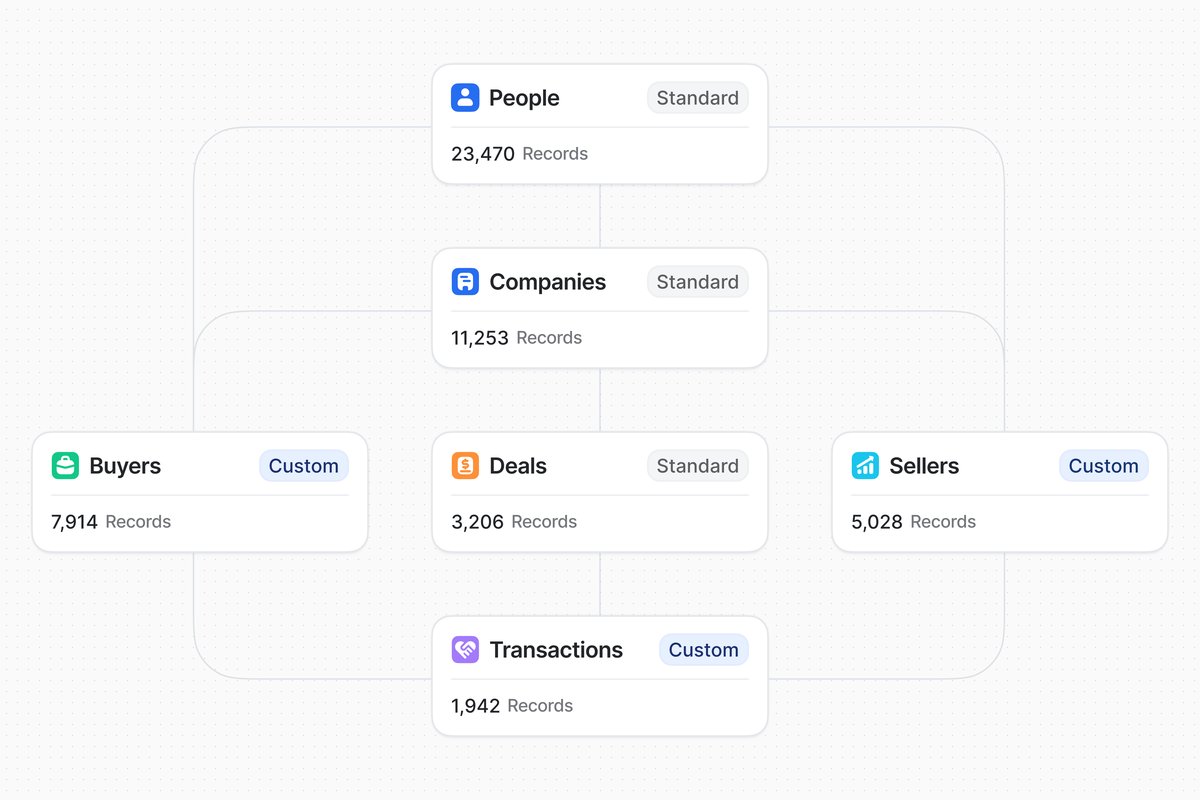 Custom objects like Buyers, Sellers, and Transactions extend Attio's standard data model for complex use cases.
Custom objects add structural weight
The distinction matters because custom objects add real structural weight to your workspace. A custom object gets its own attributes, its own relationship attributes linking it to People, Companies, or other objects, and its own activity timeline. Records in a custom object show up across the workspace: in relationship fields, in reporting, in automations. That's powerful, but it's also complexity you'll need to maintain.
When you create a custom object, you're making a structural commitment. Every view, workflow, and report you build on top of it becomes dependent on that object's existence and shape. Renaming attributes, changing relationship types, or restructuring the object later means updating every downstream dependency. This isn't a reason to avoid custom objects. It's a reason to be deliberate about when you create them.
In my experience working with 30+ Attio workspaces, the teams that get this decision right save themselves significant rework. The ones who create custom objects too early spend weeks building structure around a process that hasn't stabilised yet. The ones who wait too long end up with cluttered lists and workarounds that are harder to untangle than starting fresh would have been.
Lists are lightweight alternatives
Lists, by contrast, are lightweight. A list pulls records from an existing object and lets you layer on list-specific attributes and status tracking without touching the underlying records. A recruiting pipeline is a classic example: the people already exist in your People object, and the list adds context like "role applied for" and "interview stage" that only matters in that workflow.
Lists have several advantages over custom objects for certain use cases:
Speed of setup. You can create a list in minutes. A well-designed custom object takes planning around attributes, relationships, and how it fits into your broader data model.
Flexibility. Lists are easy to modify, duplicate, or delete. If your process changes, you adjust the list. With a custom object, changes ripple through your entire workspace.
Shared records. List records are just records from an existing object (People, Companies, or another custom object) with additional context layered on. The same person can appear in multiple lists without creating duplicate records.
Lower cognitive load. Your workspace sidebar stays cleaner. Lists live under the object they're built on, while custom objects get their own top-level entry.
The tradeoff is that lists inherit the attributes and structure of their parent object. If you need attributes, relationships, or a timeline that doesn't make sense on the parent object, a list won't work.
The test for when you need one
The test I use with clients is straightforward: does this thing need its own record page? If you're tracking deals, each deal probably has its own value, its own contacts, its own stage progression, and its own notes and emails. That's a custom object. Same goes for funds, portfolio companies, or projects, anything where you'd want to pull up a dedicated record and see a full timeline of activity. I walk through this decision for VC workspaces in my guide on setting up Attio for a VC fund.
But if you're just segmenting records that already exist (grouping companies into a "Q1 outreach" bucket, or tracking which people attended an event), that's a list. The records are People or Companies. You're just adding workflow context on top.
Here are the three questions I ask clients before creating a custom object:
-
Does this thing have its own identity? A deal is not a company. A subscription is not a person. If the thing you're tracking is genuinely distinct from your existing objects, it probably deserves its own object.
-
Does it have unique attributes? If you find yourself wanting to add attributes to Companies that only apply to some companies (like "ARR" for customers or "Check Size" for investment opportunities), those attributes probably belong on a custom object that links to Companies, not on the Companies object itself.
-
Does it have its own relationships? If you need to link this thing to both People and Companies independently (a deal has a buyer contact AND a selling company), that's a strong signal for a custom object. Lists can't model their own relationships because they inherit the parent object's relationship structure.
Common custom objects and when they make sense
Here are the custom objects I create most often for clients, and the signals that led to creating them:
Deals / Opportunities. Almost every workspace needs this. Deals have their own value, their own pipeline stages, their own timeline of conversations, and their own relationships to companies and people. This is the textbook case for a custom object. See how to build a go-to-market engine for how Deals fits into the broader architecture.
Projects / Engagements. When you're delivering work to clients (consulting, implementation, creative work), each project has its own scope, timeline, status, and team. A list on Companies doesn't capture this because you need a dedicated record for each engagement.
Subscriptions / Contracts. For SaaS companies tracking renewals, each subscription has its own start date, renewal date, value, and status. A company might have multiple subscriptions (different products, different tiers), so this can't live as an attribute on Companies.
Funds / Vehicles. For VC and investment firms, each fund has its own LPs, its own deployment schedule, and its own reporting cadence. This is clearly a separate entity from the deals flowing through the pipeline.
Partners / Referrers. When partner relationships are a meaningful part of your GTM, tracking them as their own object (linked to deals and companies) gives you better reporting on partner-sourced revenue than a tag or select attribute on Companies.
Signals that you need a custom object
A few practical signals that you need a custom object: you keep wanting to add attributes to Companies or People that only apply to some records. You need a status attribute with pipeline stages that don't make sense on your existing objects. You want relationship attributes that connect two concepts, like linking a Deal to both a Company and a Person with different roles.
More signals I watch for:
You're using a select attribute as a proxy for a relationship. If you have a "Customer Name" text field on a Projects list instead of a relationship attribute to Companies, you probably need a custom Projects object with a proper relationship.
You're duplicating data across records. If every deal record manually copies the company's industry, size, and location, you're working around the lack of a proper relationship. A custom object with relationship attributes solves this.
You need calculated attributes that aggregate across records. Rollup attributes require a relationship between objects. If you want to sum all deal values for a company, you need a Deals object linked to Companies. Lists don't support rollups in the same way.
Your list has more list-specific attributes than the parent object has attributes. When the list context overwhelms the record context, it's time for a custom object. If your "Customer Renewals" list on Companies has 10 list-specific attributes and the Companies object only has 8, those renewals should probably be their own object.
When to stay with a list
Not everything deserves a custom object. Here are situations where a list is the right call:
Temporary campaigns. "Q1 Outreach Targets" or "Event Follow-ups" are workflow contexts, not new entities. Create a list, add status and list-specific attributes, and archive it when the campaign is done.
Simple segmentation. Grouping companies by tier (Enterprise, Mid-Market, SMB) or status (Active Customer, Churned, Prospect) is a filtering problem, not a data modeling problem. Use select attributes and saved views or lists.
Parallel pipelines on the same object. If you need a "Recruiting Pipeline" alongside your "Sales Pipeline," consider whether both can live as lists on People (with different status attributes and list-specific context) before creating a custom Candidates object. If the recruiting process is simple (a few stages, a handful of attributes), a list is enough. If it's complex (its own interview scoring, its own timeline of communications, its own relationships to hiring managers), create the object.
The gradual migration path
The mistake I see most often is creating custom objects too early, before the process is stable. Lists are cheap to experiment with. Custom objects require more planning around attributes and relationships, and renaming or restructuring them later means updating every view, automation, and report that references them. Start with a list, and when you find yourself fighting its limitations, that's when you know it's time to create the object.
The migration path from list to custom object follows this pattern:
- Start with a list on an existing object (Companies or People)
- Add list-specific attributes for the context you need
- When you hit a limitation (need for independent relationships, rollups, or a dedicated record page), plan the custom object
- Design the attributes and relationships for the new object
- Create the object and migrate records from the list
- Update any workflows, reports, or views that referenced the old list
- Archive the old list
This isn't a fast process, but it's safer than building a custom object on day one and discovering three months later that your process has changed and the object doesn't fit. For more on how custom objects fit into your broader workspace design, see how to design your Attio data model. And if you're designing a SaaS workspace specifically, the guide covers which custom objects are most common for that use case.