What's the best way to connect Clay to Attio?
By Daniel Hull ·
The best approach is a two-way webhook pipeline: Attio sends new records to Clay for enrichment, and Clay pushes the enriched data back into Attio via the API. This gives you a loop that keeps your CRM data rich without anyone touching a spreadsheet.
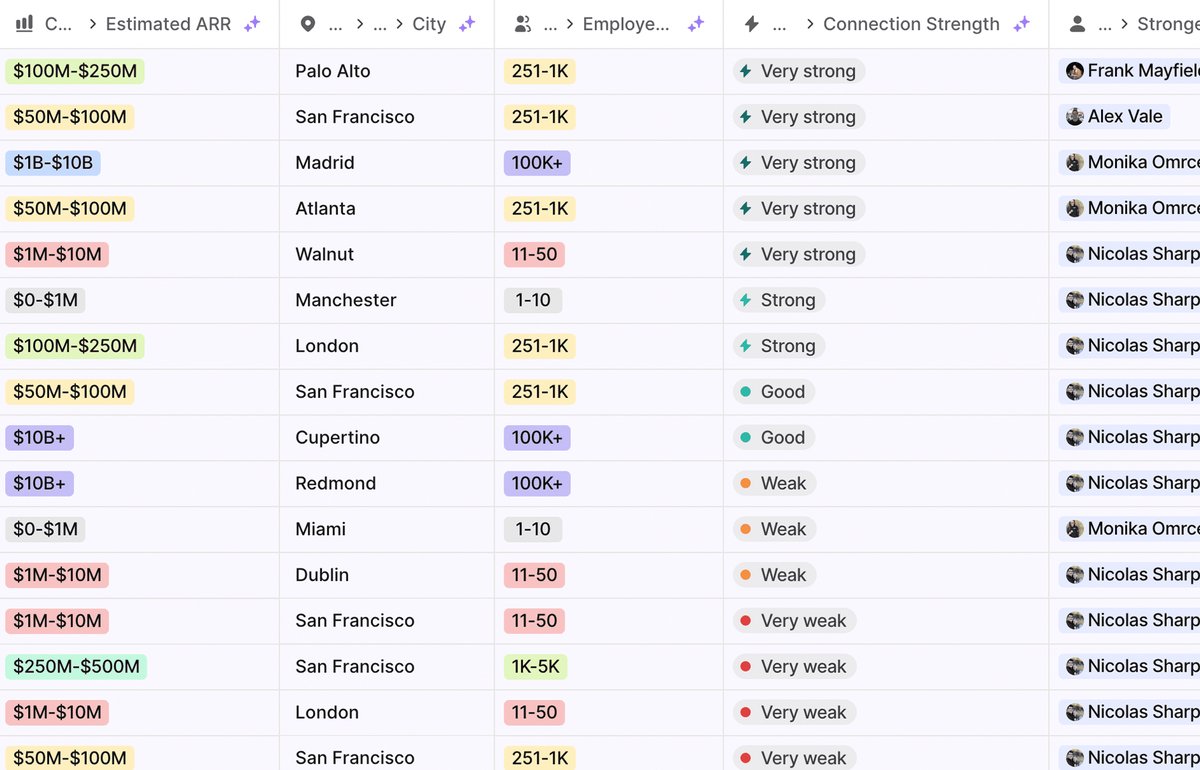 Enriched attributes in Attio automatically populate company data like ARR, headcount, and location.
Setting up the webhook pipeline
The setup works like this. You create a workflow in Attio's workflow builder that triggers when a new record lands on a list - say "New Inbound Leads." The workflow fires an HTTP request to Clay, passing the record's domain (for companies) or email address (for people) along with the Attio Record ID. Clay runs your enrichment table, pulls in whatever data points you've configured, and then uses the Record ID to write the enriched data back to the original record in Attio.
Here is a step-by-step walkthrough:
- Create a Clay table with a webhook trigger as the source. Clay will give you a webhook URL.
- Build an Attio workflow with a trigger on your target list (e.g., "Record added to Inbound Leads"). Add an HTTP request action that sends a POST to the Clay webhook URL.
- Map the payload. Include the Attio Record ID, plus the key identifiers Clay needs. For companies, send the domain. For people, send the email address. Use the
{x}variable syntax in Attio's workflow builder to pull these from the record. - Configure Clay enrichment columns. Add whatever data sources and enrichment steps you need in Clay. This is where you build the logic for what data you want.
- Write back to Attio. Add an HTTP request action at the end of your Clay table that calls the Attio API's
PATCH /v2/objects/{object}/records/{record_id}endpoint. Use the Record ID from step 3 to update the correct record.
The critical piece is passing the Attio Record ID through Clay so that the write-back hits the right record. Without it, you are stuck trying to match records by name or domain, which leads to duplicates and mismatches. For more on keeping records clean, see how to handle duplicate records in Attio.
What to enrich in Clay vs what Attio already handles
The question I get most from clients is what to enrich in Clay vs what Attio already handles. Attio's built-in enrichment covers the basics well - company name, description, categories, location, employee range, funding raised, and social profiles. For people, it pulls name, job title, company, and location. If that's all you need, you don't need Clay at all.
Here is how I break down the decision:
Attio handles natively (skip in Clay):
- Company name, description, and logo
- Employee count range
- Industry and categories
- Headquarters location
- Total funding raised
- Social profiles (LinkedIn, Twitter)
- Person name, job title, and company association
Clay adds value:
- Technographics (what tools a company runs in their stack)
- Intent signals like recent funding rounds, job postings in specific departments, or leadership changes
- Verified direct email addresses and phone numbers
- Custom enrichment logic where you chain multiple data sources together
- Revenue estimates and growth metrics
- Competitor identification
- Tech stack specifics beyond what Attio surfaces
The rule is simple: don't duplicate what Attio gives you for free. If Attio already has the company's employee count and location, skip those columns in Clay and focus on the data that Attio cannot provide natively.
When Clay adds real value
Where Clay earns its place is the layer beyond basic enrichment. The ability to chain multiple data sources together to answer specific qualification questions is where it becomes genuinely powerful.
For example, you might build a Clay table that answers: "Does this company use HubSpot, have more than 50 employees in their sales team, and have posted a CRM-related job in the last 90 days?" Each of those signals comes from a different data source, and Clay lets you chain them together in a single table. This kind of composite signal feeds directly into lead scoring models and makes your outreach dramatically more relevant.
Common Clay enrichment patterns I set up for Attio clients:
ICP qualification. Enrich with firmographic data beyond what Attio provides (revenue, department headcount, specific tech stack) and write the results back to dedicated attributes. Then use those attributes in Attio AI classification to score ICP fit automatically.
Pre-outreach research. Before an email sequence goes out, run the target list through Clay to pull recent news, competitive positioning, and verified contact details. Write the results back to Attio so the rep has context without leaving the CRM.
Event-triggered enrichment. When a prospect takes a high-intent action (visits pricing page, requests a demo), the Attio workflow sends them to Clay for deep enrichment. This lets you invest enrichment credits only on prospects who have shown real interest rather than enriching your entire database.
Account mapping. For ABM motions, use Clay to identify key personas at target accounts, find their verified contact info, and write the results back to People records in Attio with relationship attributes linking them to the target company.
Mapping Clay data to Attio attributes
When mapping Clay columns back to Attio attributes, I typically recommend creating dedicated attributes for each enriched data point rather than cramming everything into a notes field. A select attribute for "Tech Stack" or a text attribute for "Enrichment Notes" keeps the data filterable and reportable. Set up your Clay-to-Attio mapping once and it runs on every new row.
Here is how I typically structure the attributes:
- Text attributes for free-form enrichment data like company description, recent news summary, or enrichment notes
- Select attributes for categorized data like primary tech stack category, company size bucket, or industry segment
- Number attributes for quantitative data like estimated revenue, department headcount, or job posting count
- Checkbox attributes for binary signals like "uses competitor product" or "recently raised funding"
- Date attributes for time-sensitive data like "last funding date" or "latest job posting date"
The key is making the enriched data filterable. If your enrichment results live in a single text field, you lose the ability to build views, filters, and reports around them. If they live in properly typed attributes, they become first-class citizens in your data model and you can use them in workflows, calculated attributes, and reports.
Handling enrichment at scale
Once your Clay-to-Attio pipeline is running, you need to think about scale. A few considerations:
Rate limiting. Both the Attio API and Clay have rate limits. If you are processing hundreds of records per hour, make sure your Clay table handles retries gracefully. Build in delays between API calls if needed.
Credit management. Clay charges per enrichment credit, and costs add up fast if you are enriching every record with every data source. Be selective. Not every record needs deep enrichment. Use Attio workflows with conditions to only send high-priority records to Clay. For example, only enrich companies that match basic ICP criteria (right industry, right size) before spending credits on technographic data.
Data freshness. Enrichment data goes stale. A company's tech stack from six months ago might not reflect their current setup. I recommend running re-enrichment on your active pipeline records quarterly and on your broader database annually. Build a separate Attio workflow that triggers on a schedule or when a record re-enters an active stage.
Error handling. Clay lookups sometimes fail. A domain might not resolve, or a data provider might not have information on a company. Your Clay table should handle these gracefully and write a "last enriched" timestamp back to Attio so you know which records have been successfully enriched and which need attention.
Alternative approaches: Zapier and Make
One pattern that works well: use Attio's enriched attributes as the baseline, then layer Clay on top for the signals that actually drive your outreach decisions. Don't duplicate what Attio already gives you for free. Just make sure you have solid duplicate record handling in place before you start pumping enriched data in at scale. You can also explore Attio's AI features for enrichment capabilities built directly into the platform.
You can also run this through Zapier if you want a no-code path, but the webhook approach gives you more control over timing and data mapping, and it avoids the per-task costs that add up fast at scale. The Zapier path makes sense if you are enriching fewer than 100 records per month and want the simplest possible setup. Above that volume, the webhook pipeline pays for itself in control and cost savings.
Make (formerly Integromat) is another option. It offers more flexibility than Zapier for complex data transformations and is often more cost-effective at higher volumes. The setup is similar to the webhook approach but with a visual interface for building the data flow.
Regardless of which path you choose, the principle is the same: send the right records to Clay at the right time, enrich with data that Attio does not already have, and write the results back to properly structured attributes. That foundation supports everything downstream, from lead scoring to pipeline management to personalized outreach.