How do you connect Attio to Slack for deal notifications?
By Daniel Hull ·
You connect Attio to Slack through the Slack app integration, then use workflows to send messages to channels when things happen in your pipeline. An admin connects the Slack workspace from Apps and Integrations in Attio's settings, and from there you can start building notification workflows.
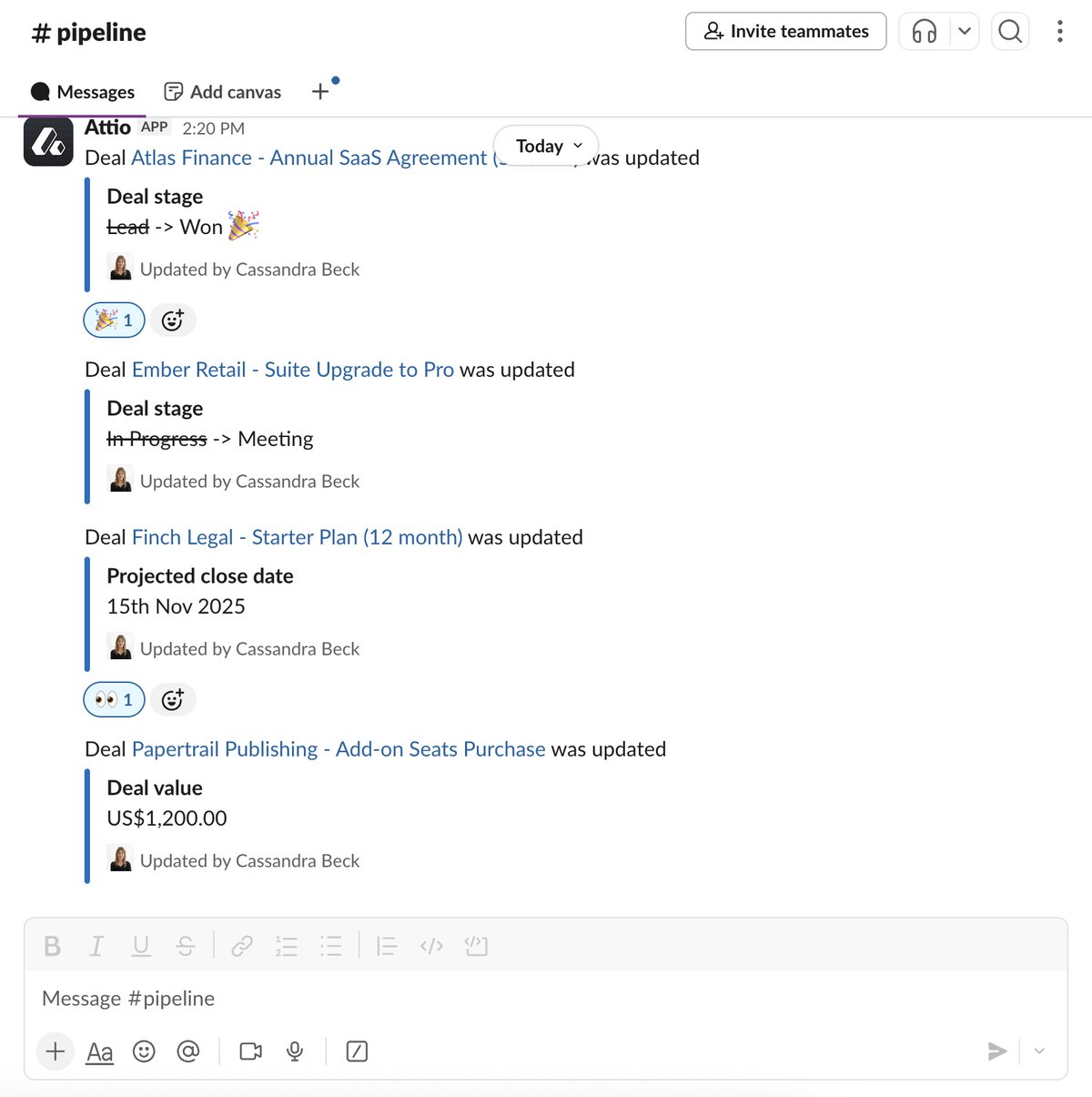 Attio pushes real-time deal updates to Slack, including stage changes, close dates, and deal values.
Set up your first notification workflow
The foundation is a workflow with a trigger tied to your pipeline and a "Post message to channel" action block. The trigger is usually a status attribute change on your Deals object, like a deal moving to Closed Won. The action sends a formatted message to whichever Slack channel you choose. You compose the message in the action block and insert record attributes using the variable syntax, so the notification can include the deal name, value, owner, and whatever else is useful.
Here is a step-by-step walkthrough for your first notification:
- Go to Workflows in Attio's left sidebar and create a new workflow.
- Set the trigger to "Record attribute changed" on your Deals list (or whatever object holds your pipeline). Select the status attribute and set the condition to "changed to Closed Won."
- Add an action block of type "Post message to channel." Select your sales Slack channel.
- Compose the message. Use the variable picker to insert dynamic values. A good starting template: "Deal won: [Deal Name] - [Currency Value] - Owner: [Owner]". Keep it scannable.
- Test the workflow by manually moving a test deal to Closed Won and verifying the Slack message appears.
The first notification I set up for most clients is the deal-won announcement. Trigger on status changing to Closed Won, send a message to your sales channel with the deal name and currency attribute value. It takes five minutes and gives the team immediate visibility into wins. That one notification alone removes the "did we close that?" back-and-forth that clutters most sales Slack channels.
Composing effective notification messages
The content of your Slack notification matters as much as the trigger. A message that says "A deal was updated" is useless. A message that says "Deal won: Acme Corp - $45,000 ARR - Owner: Sarah - Source: Inbound" gives the team everything they need at a glance.
Here are the fields I include in the most common notification types:
Deal won notification:
- Deal/company name
- Deal value (currency attribute)
- Deal owner
- Source (how the deal originated)
- Time in pipeline (if available)
Large deal alert:
- Deal/company name
- Deal value
- Current stage
- Owner
- Expected close date
Stage change notification:
- Deal/company name
- Previous stage -> New stage
- Owner
- Deal value
Stale deal warning:
- Deal/company name
- Current stage
- Days in stage
- Owner
- Last activity date
Keep messages concise. Slack notifications that require scrolling get ignored. Aim for three to five lines maximum. If someone needs more detail, they can click through to the Attio record.
Layer on more advanced patterns
From there, you can layer on more patterns. Large deal alerts are useful. Add a condition block to your workflow that checks whether the currency attribute is above a threshold before sending to a leadership channel. Pipeline stage notifications work well for handoffs, like alerting a solutions engineer when a deal moves to "Technical Review." You can also use the "Post actions to channel" block, which sends interactive buttons to Slack that trigger further workflow steps without anyone needing to open Attio. For more complex routing scenarios, I cover automating deal routing with workflows in a separate post.
Here are the notification patterns I set up most frequently beyond the basic deal-won announcement:
Large deal alerts to leadership
Build a workflow that triggers on deal creation or stage change, checks whether the deal value exceeds a threshold (say $50,000), and sends a notification to a leadership or exec Slack channel. This gives leaders visibility into high-value opportunities without them needing to check the pipeline dashboard.
Add a condition block after the trigger: "If Currency Value is greater than $50,000." Then the Slack notification action only fires for deals above that threshold. This keeps the leadership channel high-signal.
Handoff notifications
When a deal moves from one team's responsibility to another, the receiving team needs to know. A common pattern:
- Deal moves to "Technical Review" -> Notify the solutions engineering channel
- Deal moves to "Legal Review" -> Notify the legal team channel
- Deal moves to "Onboarding" -> Notify the customer success channel
Each of these is a separate workflow with a stage-specific trigger and a channel-specific action. The message should include enough context for the receiving team to pick up the deal without asking questions: deal name, value, key contact, and any relevant notes.
Weekly pipeline digest
Instead of real-time notifications for every change, some teams prefer a weekly summary. While Attio's native workflow triggers are event-based (they fire when something happens), you can build a scheduled workflow that runs weekly and posts a summary of pipeline activity. Include metrics like new deals added, deals closed, total pipeline value, and any deals that have been stuck in the same stage for too long.
Activity-based alerts
Not every useful notification is tied to a stage change. You can also trigger on attribute changes:
- New high-value deal created. When a new deal is added to the pipeline with a value above your threshold, notify the team immediately.
- Deal value changed. When a deal's value increases or decreases significantly, alert the owner and their manager.
- Deal at risk. When a deal's expected close date passes without a stage change, send a warning. This pairs well with lead scoring workflows that track engagement.
Using the simpler notification path
Attio also supports a simpler notification path that doesn't require building a full workflow. On any list or object, you can set up Slack notifications directly: send a message when a record is added to a list, when an attribute value changes, or when a new record is created. This is quicker to configure but less flexible than workflows since you can't add conditions or customise the message format.
This path works well for simple use cases:
- Notify a channel when a new company is added to a target accounts list
- Alert the team when a record's status changes on any pipeline
- Send a message when a new person record is created
If your notification needs are straightforward and don't require conditional logic, this is the fastest way to get started. You can always upgrade to a workflow-based notification later when you need more control.
Organizing your Slack channels for CRM notifications
Before you start building notifications, think about your channel structure. I see two common patterns:
Dedicated CRM channel. Create a single channel like #crm-updates or #deal-alerts that receives all Attio notifications. This keeps the noise contained and makes it easy for team members to mute if they don't need real-time updates. The downside is that high-volume pipelines can make this channel overwhelming.
Function-specific channels. Route notifications to the channels where the relevant people already are. Deal-won announcements go to #sales. Handoff notifications go to #solutions-engineering. Stale deal warnings go to #sales-leadership. This approach keeps each channel focused but requires more workflow configuration.
For most teams under 30 people, I recommend starting with a single dedicated channel and splitting into function-specific channels only when the volume becomes unmanageable. For larger teams, see what your workspace should look like at 50 users for more on scaling your notification architecture.
Avoid the notification firehose
The main thing I warn clients about is over-notifying. If every stage change on every deal sends a Slack message, people will mute the channel within a week. Start with one or two high-signal notifications (deal won and large deal alerts) and only add more when someone actually asks for them. The goal is to surface information that drives action, not to create a firehose that everyone ignores. This same principle applies when you're building a complete GTM engine - layer on complexity gradually.
Here is my recommended rollout sequence:
- Week 1: Deal won notifications only. Validate that the integration works and the team finds the messages useful.
- Week 2: Add large deal alerts (deals above your value threshold). This surfaces high-priority opportunities for leadership.
- Week 3-4: Add handoff notifications for your most common stage transitions. Start with one or two and see if the receiving teams find them useful.
- Month 2+: Add activity-based alerts (stale deals, value changes) only if the team requests them.
At each stage, ask your team: "Is this notification useful? Does it drive you to take action?" If the answer is no, remove it. Every notification that gets ignored trains people to ignore all notifications.
Common mistakes with Slack notifications
Sending every stage change to one channel. A channel that shows every deal movement in real time becomes white noise. Use conditions to filter for only the transitions that matter.
Not including enough context. A notification that says "Acme Corp moved to Proposal" is less useful than one that says "Acme Corp ($35K ARR) moved to Proposal - Owner: Sarah - Expected close: March 15." Include the fields that help someone decide whether to act.
Duplicating notifications across channels. If the same deal-won message goes to #sales, #general, and #leadership, you are creating clutter without adding value. Send each notification to exactly one channel where it will be most useful.
Not testing with the team. Build your notifications in collaboration with the people who will receive them. What seems useful in theory might be noise in practice. Run the notifications for a week and then ask for feedback.
Forgetting to update notifications when stages change. If you rename or restructure your pipeline stages, your workflow triggers may break silently. When you update your pipeline structure, review your notification workflows at the same time.
For teams using AI features alongside Slack notifications, consider adding AI-generated context to your messages. For example, when a Tier 1 lead is identified by the AI classify attribute, the Slack notification can include the classification reasoning, giving the rep immediate context on why this lead matters.