How should you capture deal values on a pipeline?
By Daniel Hull ·
For deal values on a pipeline, you should use a currency attribute on the record. Attio gives you a couple of natural approaches depending on how your pipeline is structured.
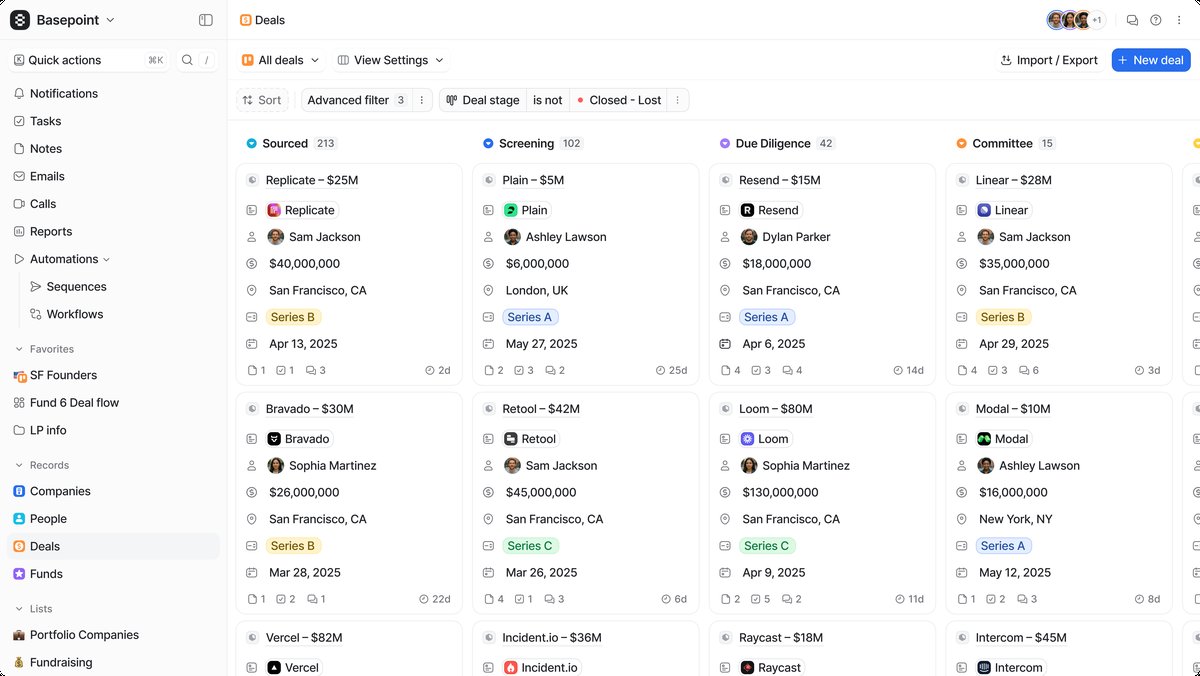 Currency attributes on deal cards make pipeline value visible at a glance across every stage.
Currency attributes vs number attributes
The cleanest setup is adding a currency-type attribute directly to the object your pipeline lives on, whether that's a custom Deals object or Companies. Currency attributes let you store a numeric value tied to a configured currency (GBP, USD, etc.), and they work natively with Attio's reporting and filtering.
You might be tempted to use a plain number attribute for deal values instead. Don't. Currency attributes carry a currency code, which matters as soon as you have deals in more than one currency or need to generate accurate pipeline reports. A number attribute has no currency context, so your reports will mix USD and GBP values without distinction. Currency attributes also format correctly in views and exports, making pipeline reviews cleaner for everyone on the team.
There is a third option I sometimes see teams attempt: using a text field with a manually typed currency symbol. This is worse than both alternatives. You lose all numeric filtering, sorting, and aggregation. You can't sum a column of text values in a report. If you've inherited a workspace that does this, migrating to a proper currency attribute should be your first priority.
Where the attribute should live
The currency attribute should live on the record itself, not as something you try to track per-stage. So if you have a Deals object with a pipeline status attribute tracking stages like "Qualified, Proposal, Negotiation, Closed Won," the deal value sits alongside that as a separate attribute on the same record. This way you can filter and sort your pipeline view by value, build calculated reports, and use it in automations.
If deal values change over time (e.g., scope increases during negotiation), you're generally better off just updating the single currency field rather than trying to maintain a history of values. Attio's audit log captures changes anyway, so you won't lose visibility into what shifted.
For teams that need to distinguish between different value types on a single deal, create separate currency attributes rather than overloading one. A common example: "Contract Value" for the total deal size and "Annual Recurring Revenue" for the yearly amount. Both live on the same Deals object, but they serve different reporting purposes. Your data model should make these distinctions explicit so your team never has to guess which number means what.
Setting up deal value on a new pipeline step by step
If you're configuring this from scratch, here is the exact workflow I walk clients through:
- Navigate to your Deals object (or whatever custom object holds your pipeline).
- Add a new attribute and select the Currency type.
- Name it clearly. "Deal Value" works for most teams. Avoid vague names like "Amount" or "Value" since those create confusion as your workspace grows.
- Set the default currency to match your primary reporting currency (USD, GBP, EUR, etc.).
- Make the attribute visible on your pipeline's kanban view by adding it to the card layout. This is what lets your team see deal values without clicking into each record.
- Add the attribute to any list views where deal value matters, such as your forecast view or your quarterly pipeline review list.
- Set up a workflow that fires when a deal moves to "Closed Won" and requires the Deal Value field to be populated. This prevents reps from closing deals without recording the value.
Once this is live, test it by creating a sample deal, entering a value, and confirming that the value appears on your kanban cards and in your reporting views. Small upfront verification saves you from discovering gaps during your next pipeline review.
How deal values flow into reporting
Once you have a currency attribute on your deals, reporting unlocks immediately. You can build insight reports that sum pipeline value by stage, track weighted pipeline using calculated attributes that multiply deal value by a probability percentage, and measure average deal size trends over time. Without a currency attribute in place, none of these reports are possible -- which is why this is one of the first attributes I set up for any client.
The reports I recommend building first:
- Pipeline value by stage. A simple bar chart showing total value at each stage of your pipeline. This tells you where your money is sitting and whether you have enough coverage to hit your target.
- Average deal size over time. Track whether your deals are getting bigger or smaller. A downward trend here can signal pricing pressure or a shift in your ICP.
- Pipeline velocity. Combine deal value with time-in-stage data to see how quickly value moves through your pipeline. Slow stages become obvious and give you something concrete to optimize.
- Rep performance by deal value. Break down total closed value by owner. This goes beyond counting closed deals and shows which reps are landing the highest-value opportunities.
For teams running a SaaS sales motion, I also recommend a report that shows MRR or ARR by cohort, so you can see whether the deals you closed three months ago are retaining their value through renewals.
Building a weighted pipeline
One of the most useful things you can do with deal values is build a weighted pipeline. The concept is simple: multiply each deal's value by the probability of closing, and the sum gives you a more realistic view of expected revenue than raw pipeline totals.
In Attio, you implement this with a calculated attribute. First, add a number attribute called "Close Probability" (as a percentage, 0-100). Then create a calculated attribute that multiplies Deal Value by Close Probability and divides by 100. The result is your weighted value per deal.
You can assign probability defaults per stage. For example, a deal at "Discovery" might carry a 10% probability, while "Negotiation" carries 60%. Some teams set this up as a convention (reps manually enter it), while others use a workflow that automatically updates Close Probability when a deal moves between stages. The automated approach is more consistent and eliminates the "forgot to update the probability" problem.
Your weighted pipeline total becomes the number your leadership team uses for forecasting. It's more honest than raw pipeline value because it accounts for the reality that not everything in your pipeline will close. When your CEO asks "what's our pipeline look like?" -- the weighted number is what you give them.
Tips for multi-currency setups
If your team sells internationally, you'll need to decide whether to use a single currency attribute with a base currency (converting everything to USD, say) or track values in their original currency. Attio's currency attribute is configured per attribute, so a single field stores all values in one currency. The practical approach I recommend is picking a base reporting currency and converting at the point of entry. This keeps your pipeline totals accurate and your reports meaningful. If you need to preserve the original currency for invoicing or legal reasons, add a second select attribute for "Original Currency" and a number attribute for the unconverted amount alongside your primary currency field.
For SaaS companies tracking MRR or ARR, consider whether deal value represents a one-time amount or a recurring figure, and document that convention clearly so your team enters values consistently.
Teams with significant international business should also establish who is responsible for setting the exchange rate at point of entry. Leaving it to individual reps introduces inconsistency. The cleanest approach is to pick a rate source (e.g., the rate on the day the deal was created) and document it in your workspace's internal wiki or onboarding materials. This matters less when you have five deals a quarter and a lot more when you have fifty.
Common mistakes I see teams make
After setting up deal value tracking across dozens of workspaces, the same mistakes come up repeatedly:
Not making the field required. If deal value is optional, reps will skip it. Then your pipeline reports show misleading totals because half your deals have no value attached. Use a workflow or a team convention to enforce this. The best trigger point is when a deal moves past the initial qualification stage.
Mixing value types in one field. Some teams enter contract value for some deals and annual recurring revenue for others, in the same attribute. This makes every report meaningless. If you need both numbers, create two currency attributes with clear names.
Entering values with the wrong number of zeros. A $50,000 deal entered as $500,000 throws off your entire pipeline forecast. This is hard to prevent entirely, but reviewing pipeline value outliers weekly catches these errors before they distort your reporting.
Ignoring deal value on lost deals. When a deal moves to "Closed Lost," keep the deal value populated. You need this data to analyze how much revenue you're losing and at which stages. Clearing the value when a deal is lost destroys analytical value.
Not connecting deal value to company-level rollups. A calculated attribute on your Company object that sums all related Deal values gives your account managers instant visibility into total pipeline and total closed revenue per account. Without this, they're clicking into individual deals to piece together the picture.
If you're setting up deal values for the first time or cleaning up an existing setup, start with the basics: one currency attribute, one currency code, required at the right stage. You can layer on weighted pipeline, multi-currency support, and advanced reporting once the foundation is solid. The foundation is what matters. Get the data model right and everything downstream works. Get it wrong and you're rebuilding in six months.