How do you track customer renewals in Attio?
By Daniel Hull ·
You need a date attribute for the renewal date, a dedicated pipeline, and a workflow that connects the two. That's the core of it. Everything else is refinement.
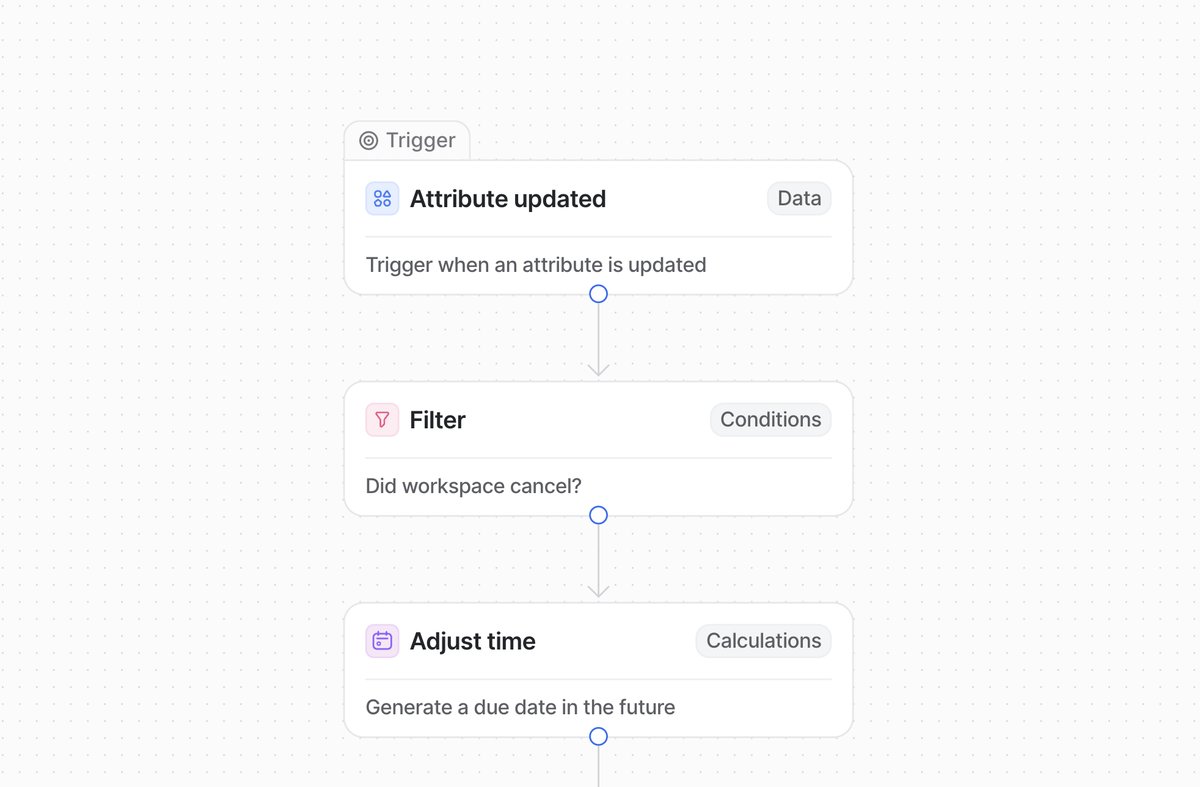 A churn monitoring workflow in Attio triggers when subscription attributes change and calculates renewal dates.
Setting up the renewal date attribute
Start by adding a date attribute called something like "Renewal Date" to whatever object holds your customer records, usually a custom Deals object or a dedicated Customers object. This is the anchor for everything that follows. Every record that represents an active contract gets a renewal date, and that date is what your automations will key off.
Next, set up a status attribute to act as your renewal pipeline. I typically use stages like "Active," "Upcoming Renewal," "In Review," "Renewed," and "Churned." This gives your CS team a kanban view of the entire renewal book, and it separates renewal tracking from your sales pipeline so neither view gets cluttered.
Beyond the date and status, there are a few more attributes I always add to the renewal object:
- Contract Value (currency attribute). This is the ARR or contract amount at stake. You need this to sort your renewal pipeline by revenue at risk, which is the only view that actually drives CS prioritization. See capturing deal values on a pipeline for the right way to set up currency attributes.
- Account Owner (relationship attribute or actor reference). This links each renewal to the CSM or account manager responsible. Without this, renewal tasks have no clear owner.
- Last Health Check Date (date attribute). Tracking when you last had a substantive conversation about the account keeps the CS team honest about coverage.
- Renewal Notes (text attribute). A short field for context like "expanding to new team," "price-sensitive," or "champion left." This saves your CSM from digging through activity history for the one-line summary they need before a renewal call.
Automating with workflows
The workflow is where it comes together. Set up a trigger based on the renewal date attribute. Attio's workflow builder lets you fire workflows when a date is a certain number of days away. I usually recommend two: one that moves the record to "Upcoming Renewal" 90 days before the date, and another that creates a task assigned to the account owner 60 days out. That gives the CS team enough runway to start the conversation without leaving it so late that the customer has already made a decision.
Add a currency attribute for contract value or ARR on the same object. Calculated attributes like rollups can aggregate this across your entire book. This lets you sort your renewal pipeline by revenue at risk, which is the view your CS lead actually cares about. When a record moves to "Churned," you can see the financial impact immediately.
Here is the complete workflow sequence I set up for most clients:
- 120 days before renewal: Send a Slack notification to the CS channel flagging the upcoming renewal. This is early awareness, not action.
- 90 days before renewal: Automatically move the record to "Upcoming Renewal" status. This surfaces it in the CS team's working view.
- 60 days before renewal: Create a task assigned to the account owner with the title "Begin renewal conversation with [Company]." This is the action trigger.
- 30 days before renewal: If the record is still in "Upcoming Renewal" (meaning no one has moved it to "In Review"), send a follow-up Slack notification to the CS lead. This is the escalation.
- On renewal date: If the record is not in "Renewed" or "Churned," flag it as overdue. A workflow that updates a checkbox attribute called "Renewal Overdue" works well here because you can filter views on it.
Each of these workflows is simple on its own. Together, they create a safety net that makes it very hard for a renewal to slip through unnoticed.
Building the renewal pipeline view
The renewal pipeline itself needs to be a separate list from your sales pipeline. I've seen teams try to manage renewals on the same pipeline as new business, and it always creates noise. Your sales reps don't need to see renewals cluttering their kanban, and your CS team doesn't need deal flow stages confusing their view.
Create a dedicated list on your Deals object (or Customers object, depending on your data model) and filter it to only show records where the Renewal Date attribute is populated. Then set up two views:
The kanban view groups records by renewal status (Active, Upcoming Renewal, In Review, Renewed, Churned). This is the operational view your CS team uses in their weekly meetings. Sort cards by contract value so the highest-value renewals sit at the top of each column.
The table view shows all renewals sorted by date, with columns for Company, Contract Value, Account Owner, Renewal Date, and Status. This is the view your CS lead uses for reporting and for catching anything that might have been miscategorized in the kanban.
Both views should be shared with your CS team at "Read and write" access and with your sales leadership at "Read only." This cross-visibility matters. Your VP of Sales needs to see the renewal book because churn directly impacts net revenue metrics, but they shouldn't be moving cards around in a pipeline they don't own.
Patterns that work well
A couple of patterns I always set up for clients: a Slack notification when a high-value renewal moves to "In Review," and a workflow that automatically creates a new deal record with the next renewal date when a record hits "Renewed." That second one keeps the cycle going without anyone having to remember to set it up manually.
The filtered list is the final layer. Create a list view showing only records where the renewal date falls within the next quarter. This becomes your CS team's working view, a focused slice of the pipeline that shows exactly what needs attention now, not six months from now.
Another pattern that works well for SaaS companies: creating a "Renewal Health" select attribute with options like "Green," "Yellow," and "Red." CSMs update this manually based on their judgment of the account. It adds a subjective signal that pure data can't capture. A customer might be technically due for renewal in 60 days (fine by the numbers), but the CSM knows their champion just left the company (red). That context changes how you prioritize.
Connecting renewals to expansion revenue
Renewals are not just about retention. They're your best opportunity for expansion. When a CSM is already in a renewal conversation, they should be looking for upsell and cross-sell opportunities. Your Attio workspace can support this by adding a currency attribute for "Expansion Value" alongside your Contract Value.
The workflow here is straightforward: when a renewal moves to "Renewed" and the new Contract Value is higher than the previous one, log the difference as expansion revenue. You can do this with a calculated attribute that computes the delta, or with a workflow that populates an expansion field based on the change.
Tracking expansion alongside renewal gives your CS team credit for revenue growth, not just retention. It also gives leadership a clearer picture of net revenue retention (NRR), which is the metric that separates good SaaS businesses from great ones.
What I see teams get wrong with renewal tracking
Tracking renewals in spreadsheets alongside the CRM. This is the most common antipattern. If your CS team maintains a Google Sheet for renewals because "the CRM doesn't do it well enough," that's a signal that your CRM setup needs work, not that you need a spreadsheet. Every renewal should live in Attio, with the same workflows and visibility as your new business pipeline.
No clear ownership per renewal. If a renewal record doesn't have an assigned account owner, it belongs to everyone, which means it belongs to no one. The account owner attribute should be populated automatically when a new business deal closes and the relationship transfers to CS. Use a deal routing workflow to handle this handoff.
Starting renewal conversations too late. Sixty days is the minimum lead time for a meaningful renewal conversation. For enterprise contracts, start at 120 days. Your workflows should reflect the actual sales cycle of your renewal motion, not an arbitrary number.
Not tracking the reason for churn. When a customer churns, add a select attribute for "Churn Reason" with options like "Price," "Product Gaps," "Champion Left," "Acquired," and "Not Using." This data is gold for product and leadership teams. After a quarter of tracking, patterns emerge that you can actually act on.
Ignoring multi-year contracts. If some customers are on annual contracts and others are on multi-year deals, your renewal date logic needs to handle both. A customer on a three-year contract shouldn't show up in your 90-day renewal workflow every year. Set the renewal date to the actual contract end date, not the anniversary of signing.
Keep the renewal pipeline separate from your sales pipeline but on the same object. That way relationship attributes, notes, and activity history carry across from the original deal. Your CS team gets full context without having to dig through a different part of the workspace. For a broader look at how this fits into a SaaS workspace, see designing your Attio workspace for a SaaS company.
Measuring renewal performance
Once your renewal pipeline is running, you need to measure how well it's working. The core metrics to track using Attio's reporting features:
- Gross retention rate. Total renewed ARR divided by total up-for-renewal ARR. This tells you how much revenue you're keeping.
- Net retention rate. Include expansion revenue in the numerator. This is the number investors and boards care about most.
- Average time to renew. How many days between a renewal entering "Upcoming Renewal" and reaching "Renewed." If this is getting longer, your renewal process has friction.
- Churn by segment. Break down churned revenue by company size, industry, or plan tier. This tells you where to focus retention efforts.
- CSM renewal load. How many renewals each account owner is managing per quarter. Uneven distribution leads to dropped renewals.
Build these as saved views or insight reports in Attio and review them monthly. The goal is not just to track renewals, but to build a system that gets better at retaining customers over time. The data tells you where to improve. The workflows make sure nothing falls through the cracks.