How should you use Attio's AI features in your workflow?
By Daniel Hull ·
Attio's AI features fall into three areas worth understanding: Ask Attio, AI attributes, and the research agent. Each solves a different problem, and knowing where they genuinely help versus where they're a novelty will save you time.
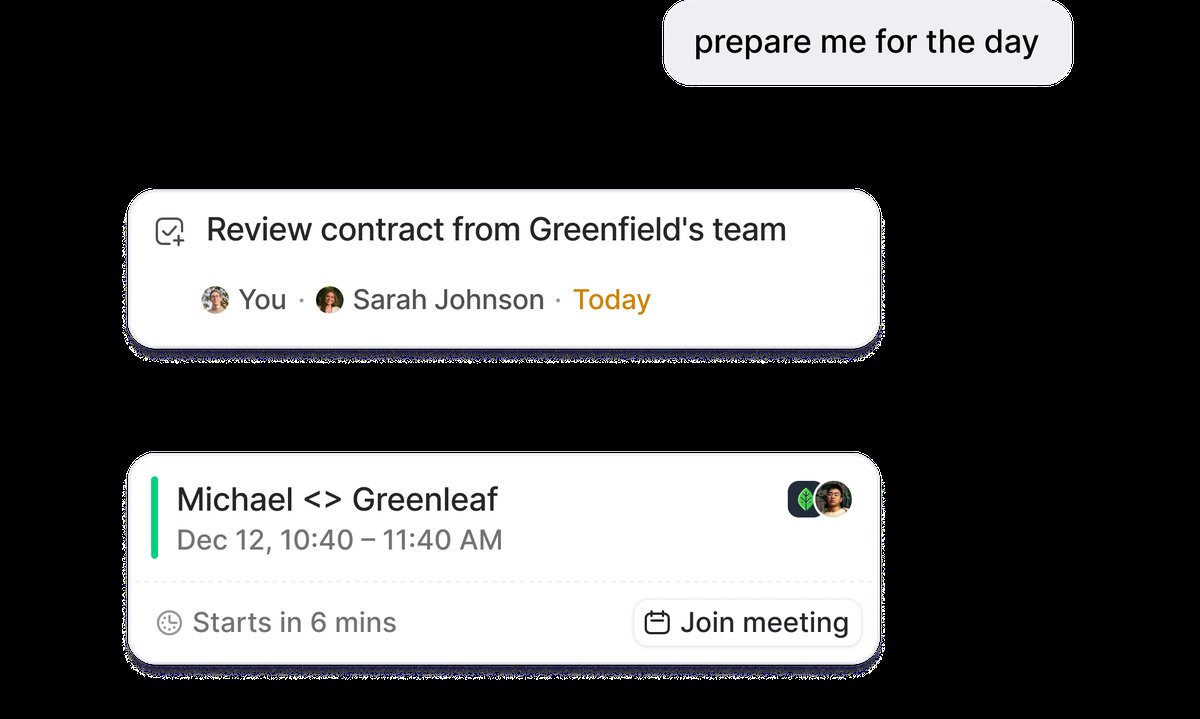 Ask Attio surfaces your tasks, meetings, and key context in a single AI-generated briefing.
Ask Attio for quick lookups and meeting prep
Ask Attio is the natural language interface. You can search across your workspace, create records, and surface insights by typing a question rather than building a filter. It's useful for quick lookups - "which deals closed last month over $50k" or "show me companies in the pipeline with no activity in 30 days." Where it really earns its place is meeting prep. Before a call, you can ask it to pull together everything you know about a company - past interactions, deal history, key contacts - without clicking through half a dozen records. I find it most valuable for people who need answers from the CRM but don't want to learn every filtering pattern. If you want more structured visibility, you can also build reports alongside using Ask Attio.
The key to getting good results from Ask Attio is asking specific questions. "Tell me about Acme Corp" will give you a generic summary. "What is our deal history with Acme Corp, who are the key contacts, and when was our last interaction?" will give you something you can actually use in a meeting. The more specific your question, the more targeted the response.
Ask Attio can also perform actions, not just answer questions. You can say "create a new company called Acme Corp with domain acme.com" or "add a note to the Acme Corp record about our pricing discussion." This makes it a useful shortcut for quick data entry, especially on mobile or when you don't want to navigate through the full UI.
AI attributes that work at scale
AI attributes are where things get more interesting at scale. These are attributes on your records that use AI to generate values automatically. There are four types: classify record, summarise record, prompt completion, and the research agent.
Classify record
Classify record is the one I use most with clients. You can have Attio automatically categorise records based on all the context stored against them - segmenting prospects by ICP fit, tagging companies by industry vertical, or scoring leads based on their attributes and interaction history. This works well because it operates on structured data you already have, so the output is reliable. Pair it with a select or number attribute type and you've got automated lead qualification that actually holds up. I cover how to take this further in my guide on setting up lead scoring.
Here are the classify record use cases I set up most frequently:
- ICP Fit Tier. Classify companies into Tier 1, 2, or 3 based on employee count, industry, funding stage, and geography. This replaces manual tagging and ensures every new company gets scored consistently.
- Lead Temperature. Classify leads as Hot, Warm, or Cold based on engagement signals like email opens, meeting attendance, and website visits.
- Segment. Classify companies into segments like "Enterprise," "Mid-Market," or "SMB" based on their attributes. This is useful for routing deals to the right team and tailoring outreach.
- Churn Risk. For customer success teams, classify existing customers by risk level based on usage data, support ticket volume, and engagement frequency. This works well alongside tracking customer renewals.
The key to making classify work well is writing a clear, specific prompt. Don't just say "classify this company." Say "classify this company into one of these categories based on the following criteria." The more explicit you are about the classification logic, the more consistent the results.
Summarise record
Summarise record is straightforward - it distils a record with dozens of attributes and linked records into a concise summary. Useful for onboarding new team members or getting up to speed on an account you haven't touched in weeks.
I have found this most valuable in two scenarios. First, when a deal changes hands between reps. Instead of the new owner spending an hour reading through notes and email threads, the AI summary gives them the key context in seconds. Second, during pipeline reviews. Managers can scan AI summaries to quickly understand the state of each deal without opening every record individually.
Prompt completion
Prompt completion is the most flexible AI attribute type. You write a custom prompt, and Attio generates a response for each record. This is essentially a custom AI field that you design. Examples include generating personalized outreach hooks based on a company's recent news, drafting follow-up email suggestions based on meeting notes, or creating talking points for upcoming calls.
The trick with prompt completion is keeping the output actionable. A prompt that generates a paragraph of generic analysis is not useful. A prompt that generates three bullet points your rep can paste into an email is useful. Focus on outputs that reduce a step in someone's workflow.
The research agent goes deeper than enrichment
The research agent is the feature that surprises people. It searches the web from inside Attio, pulling back information about companies or contacts - funding rounds, leadership changes, tech stack, recent news. You can run it across an entire list, which means enriching hundreds of records without leaving your CRM. It goes deeper than standard enrichment providers because it's not limited to a fixed dataset. I typically recommend it for pre-outreach research: before an email sequence goes out, run the research agent to fill in context that makes personalisation genuine rather than templated. It also pairs well with tools like Clay for enrichment workflows.
When to use the research agent vs external enrichment
The research agent is best for qualitative, contextual information that changes frequently. Things like recent news, strategic priorities, competitive positioning, and leadership changes. This kind of information is hard to get from structured data providers because it requires interpreting unstructured web content.
For structured, quantitative data - employee counts, revenue estimates, tech stack specifics, verified contact information - tools like Clay or other enrichment providers are usually more reliable. They pull from curated databases and give you consistent, structured output that maps cleanly to Attio attributes.
The best approach is to use both. Let Attio's built-in enrichment and the research agent handle the context layer, and use Clay or similar tools for the data layer. This way your records have both the structured data you need for filtering and scoring, and the contextual intelligence you need for personalized outreach.
Practical patterns for using AI in your workflows
Here are three patterns I set up regularly that combine AI features with other Attio capabilities:
Pattern 1: Automated lead qualification
- New lead enters your inbound pipeline
- AI classify attribute scores ICP fit as Tier 1, 2, or 3
- Research agent enriches the record with recent news and context
- A workflow triggers on the classify result: Tier 1 leads get routed immediately to a senior AE, Tier 2 goes to the general pool, Tier 3 gets added to a nurture email sequence
- The Slack notification fires for Tier 1 leads so the team knows a high-value prospect just came in
This entire flow happens without anyone manually reviewing the lead. The AI handles the classification, the workflow handles the routing, and the team only touches the leads that matter most.
Pattern 2: Meeting prep automation
- Before a scheduled meeting, Ask Attio pulls the full context on the company and contacts
- The summarise record attribute gives a quick snapshot of the relationship history
- The research agent surfaces any recent developments (new funding, leadership changes, product launches)
- The rep walks into the meeting informed without doing manual research
Pattern 3: Portfolio monitoring for VCs
For firms using Attio to manage a portfolio (covered in setting up Attio for a VC fund), the research agent can monitor portfolio companies for news and developments. Run it weekly across your portfolio list and pipe the results into a summary view that the investment team reviews during their Monday meeting.
What I see teams get wrong with AI features
Turning on everything at once. The most common mistake. Teams enable every AI attribute type on every object and end up with noisy, inconsistent data that nobody trusts. Start with one use case, validate it, and expand from there.
Not validating the output. AI classification is useful, but it is not perfect. Before you route leads based on AI scoring, run it on a sample set and check the results against your own judgment. Tune the prompt until the accuracy is where you need it. This is especially important for lead scoring workflows where a misclassification could mean a high-value lead gets ignored.
Using AI where a simple rule would work. If your classification logic is "companies with more than 500 employees are Enterprise, 50-500 are Mid-Market, under 50 are SMB," you don't need AI. A calculated attribute or conditional workflow handles that deterministically. Save AI for cases where the classification requires interpreting multiple signals that are hard to reduce to a simple rule.
Expecting the research agent to replace your enrichment stack. The research agent is good at finding qualitative context but is not a substitute for a structured enrichment provider like Clay. Use both. Let each tool do what it does best.
The practical advice is to start with one. Pick the AI feature that addresses your biggest time sink - usually classify record for teams drowning in manual tagging, or the research agent for teams doing outreach without enough context - and build from there. The Attio Help Center has walkthroughs for configuring each AI attribute type.