How should you structure a multi-stage pipeline in Attio?
By Daniel Hull ·
Pipelines in Attio are driven by status attributes. A status attribute defines the stages a record moves through ("New Lead -> Discovery -> Proposal -> Negotiation -> Closed Won") and each stage becomes a column in a kanban view. Getting the structure right here matters more than most teams realise, because a messy pipeline erodes trust in the data fast.
Choosing the right number of stages
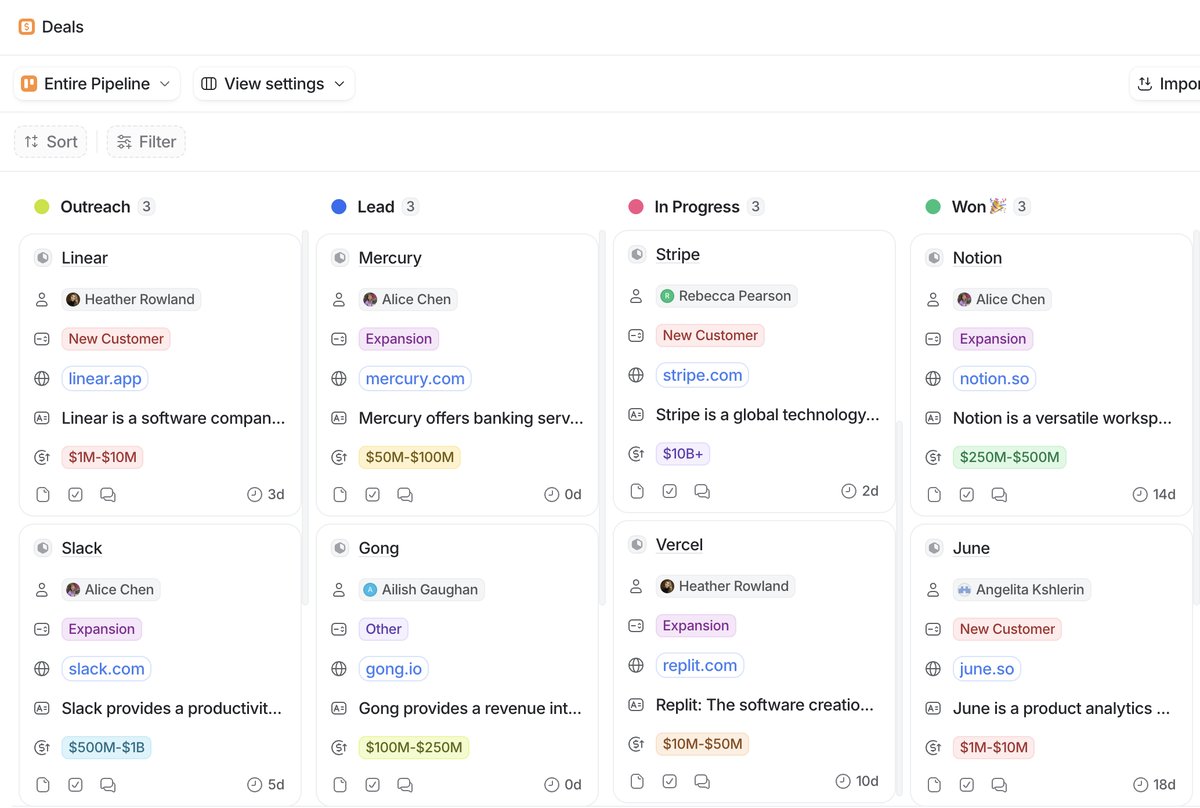 A multi-stage pipeline in Attio displayed as a kanban board with deal cards, owners, and time-in-stage.
The most important thing is that each stage should represent a meaningful, observable change in the deal's state. If your reps can't clearly tell whether a deal belongs in "Discovery" or "Qualification," those are probably the same stage. In practice, 5 to 7 active stages tends to be the sweet spot. Fewer than that and you lose visibility into where things are stalling. More than that and people stop updating statuses because it feels like busywork.
I typically stress-test stages with a simple question: "What has to happen for a deal to move from this stage to the next?" If the answer is vague, the stages need consolidation. If the answer is clear and specific, the stages are well-defined. Here is an example of a pipeline that works well for a B2B SaaS company:
- New Lead - Initial contact or inbound request received
- Discovery - First meeting held, needs and budget discussed
- Proposal - Proposal or SOW sent to the prospect
- Negotiation - Terms being discussed, procurement involved
- Closed Won - Deal signed and payment confirmed
- Closed Lost - Prospect declined or went silent
Each transition has a concrete, observable action. The rep knows exactly when a deal should move. There is no ambiguity. Compare this to pipelines I see teams build with stages like "Warm," "Hot," and "Very Interested." Those are subjective judgments, not workflow states, and they lead to inconsistent data.
Active vs closed statuses
Status attributes in Attio distinguish between active and closed statuses. Your active statuses are the stages where deals are still in play, everything from first contact through to negotiation. Closed statuses are your terminal states: Closed Won, Closed Lost, maybe Disqualified. This distinction matters because it affects how Attio handles reporting and filtering. When you build pipeline reports or dashboard views, you'll typically want to focus on active deals, and having your closed statuses properly categorised makes that trivial.
The active vs closed distinction also matters for pipeline hygiene. Deals in active stages should represent real, live opportunities. Deals in closed stages are historical records. If you have deals sitting in active stages for months with no updates, your pipeline is lying to you. I recommend building a workflow that flags or notifies owners when a deal has been in the same active stage for longer than a defined threshold. Attio's workflow builder can trigger on "time in stage" conditions, which makes this straightforward to automate.
It is also worth thinking about how many closed statuses you need. Most teams do well with two: Closed Won and Closed Lost. Some add a third for Disqualified, which is useful for distinguishing between "we lost the deal competitively" and "this was never a real opportunity." Beyond three closed statuses, you are usually overcomplicating things. If you want granularity on why a deal was lost, add a "Lost Reason" select attribute instead of creating separate stages for each reason.
Naming your stages for clarity
Stage names seem trivial, but they matter more than you might think. Good stage names are:
- Verb-oriented or state-oriented. "Discovery" or "Proposal Sent" are clear. "Maybe" or "Pending" are not.
- Unambiguous. Every member of the team should put the same deal in the same stage given the same facts. If two reps would disagree about where a deal belongs, the stage names need work.
- Consistent in tense and format. Pick a convention and stick with it. Either use nouns ("Discovery," "Negotiation") or past participles ("Qualified," "Proposed"). Mixing them creates cognitive friction.
I generally advise against naming stages after internal team handoffs ("SDR Qualified," "AE Accepted") unless your pipeline is explicitly designed to track handoffs. In most cases, stages should reflect where the deal is in the buyer's journey, not which internal team is currently responsible. If you need to track ownership transitions, use an owner attribute and automate deal routing with workflows.
Handling multiple deal types
One thing I see teams overcomplicate: trying to shove fundamentally different deal types into a single pipeline. If your enterprise sales process has completely different stages from your self-serve product-led motion, don't force them through the same status attribute. Create separate lists, each with its own status attribute and stages tailored to that workflow. A list in Attio is built on an object, so you can have multiple lists referencing the same Deals object, each with different list-specific attributes and views. This keeps each pipeline clean without duplicating your underlying data. If you're deciding whether your deal type warrants its own object entirely, see when to create a custom object in Attio.
Common scenarios where separate pipelines make sense:
- Enterprise vs SMB. Enterprise deals have stages like "Security Review" and "Legal Review" that don't exist in an SMB motion.
- New business vs renewals. The stages for acquiring a new customer are different from the stages for renewing an existing one. For renewal-specific workflows, see how to track customer renewals in Attio.
- Partnerships vs direct sales. Partnership deals involve different stakeholders and different milestones.
- Investment pipelines. If you are running a VC fund, your deal flow pipeline has stages like "Sourcing," "Due Diligence," and "Term Sheet" that have nothing to do with a sales process. I cover this in detail in setting up Attio for a VC fund.
Adding the right attributes to your pipeline
The status attribute defines your stages, but a useful pipeline needs more context on each deal. Here are the list attributes I set up on nearly every sales pipeline:
- Owner (actor reference) - who owns this deal
- Deal Value (currency) - the expected revenue, which I cover in more detail in capturing deal values on a pipeline
- Expected Close Date (date) - when the deal is expected to close
- Source (select) - where the deal originated (inbound, outbound, referral, partner)
- Next Step (text) - a short note on the immediate next action
- Priority (rating or select) - how important this deal is relative to others
These are all list attributes because they are specific to this pipeline's workflow. The underlying deal or company record might also have object attributes like industry, employee count, and tier, but those live on the object and are visible everywhere. The separation between list and object attributes is what keeps the data model clean.
Automating pipeline workflows
Workflows are where status attributes become really powerful. You can trigger automations on stage changes: sending a Slack notification when a deal hits Proposal, assigning a task when something moves to Negotiation, or auto-populating a close date when a deal reaches Closed Won. Keep your stages clean and these automations stay simple. For more on building these automations, see Attio's workflow builder.
Here are the workflows I set up most frequently on pipelines:
- Deal won notification. When a deal moves to Closed Won, send a message to the sales Slack channel with the deal name, value, and owner. This is usually the first automation teams build and it has an outsized effect on morale.
- Stage change alerts for handoffs. When a deal moves to a stage that involves a different team member (like Technical Review or Legal Review), notify the relevant person and assign a task.
- Stale deal reminders. When a deal has been in the same active stage for more than 14 days (or whatever threshold makes sense for your sales cycle), notify the owner and their manager.
- Auto-populate fields. When a deal is created, auto-set the owner based on territory or round-robin rules. When a deal closes, auto-set the actual close date.
- Lead score threshold actions. When a deal's associated lead score crosses a threshold, automatically move it to a qualified stage. I cover this pattern in how to set up lead scoring in Attio.
What I see teams get wrong
Too many stages. If you have 12 active stages, your reps will not maintain them. They will skip stages, leave deals in the wrong column, and your pipeline data becomes unreliable. Consolidate aggressively.
Stages that overlap. "Interested" and "Engaged" are not different stages. Neither are "Qualified" and "Sales Qualified." If you cannot articulate a clear, observable difference between two stages, merge them.
No entry criteria. Every stage should have a definition of what must be true for a deal to be in that stage. Without this, stage assignments become subjective and your pipeline reports become fiction. Document these criteria and share them with the team.
Ignoring the kanban view. The kanban view is the natural home for your pipeline. Each status becomes a column, and your team drags deals between them. If a column is permanently empty or permanently overflowing, that's a signal your stage definitions need adjusting. An empty column means the stage is either unnecessary or deals are skipping it. An overflowing column means deals are getting stuck and the team needs to address the bottleneck.
Not using closed statuses properly. I have seen teams leave every lost deal in an active "On Hold" stage instead of moving it to Closed Lost. This inflates the pipeline and makes forecasting impossible. Be disciplined about closing deals that are dead. You can always reopen them later by moving them back to an active stage.
For a broader look at how pipelines fit into your overall go-to-market architecture, see how to build a GTM engine in Attio. And if you are designing your workspace from scratch, the pipeline is just one piece of the puzzle covered in how to design your Attio data model.