How do you set up email sequences in Attio?
By Daniel Hull ·
Sequences in Attio are multi-step email campaigns that you build under Automations. You create a sequence, add your email steps with delays between them, and enrol people either manually or through a workflow trigger. The feature is available on Pro and Enterprise plans.
Building your first sequence
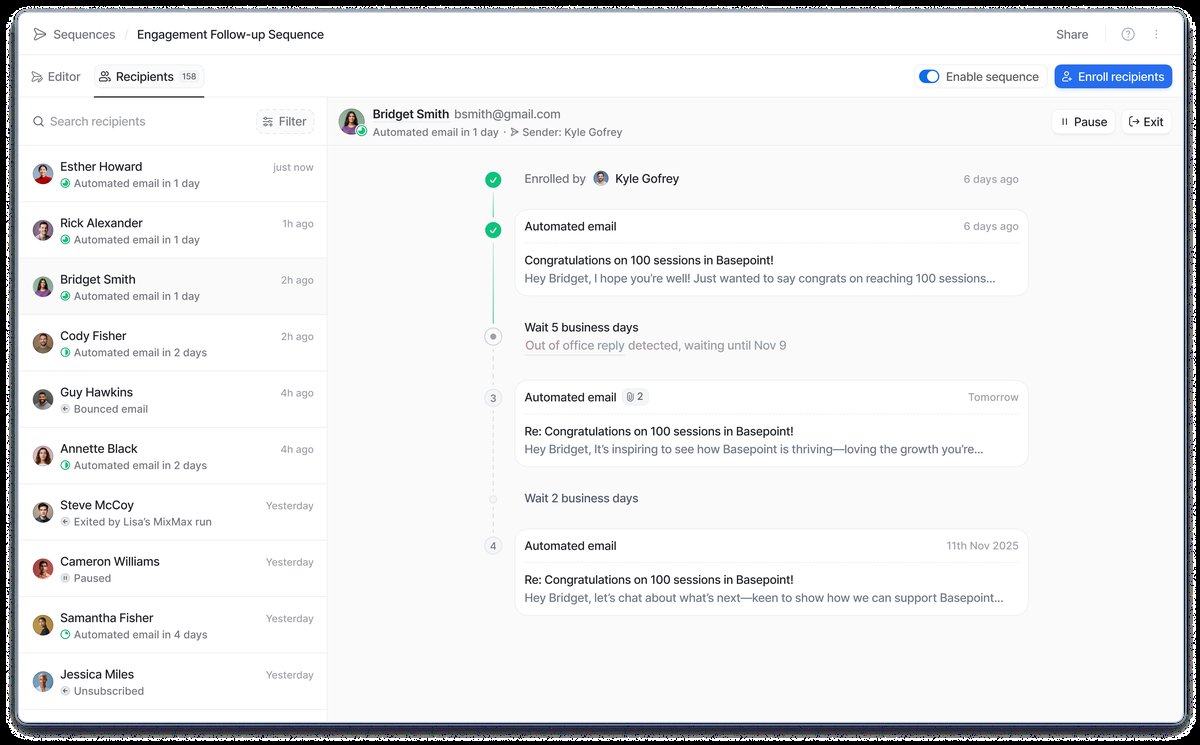 Attio Sequences lets you build multi-step email campaigns with personalization and scheduling controls.
To set one up, go to Automations, select Sequences, and create a new sequence. You'll configure a sending window (the hours and timezone during which emails can go out), decide whether to restrict to business days only, and then draft your email steps. Each step after the first needs a delay of at least one day. You can thread emails so follow-ups appear as replies to the original message, which I'd recommend for most outreach sequences.
Here's the step-by-step process for building your first sequence:
- Navigate to Automations in the sidebar and select Sequences
- Click "Create sequence" and give it a descriptive name (I recommend naming it after the trigger or use case, like "Inbound Demo Request Follow-up" or "Cold Outreach - SaaS CTOs")
- Set your sending window. Choose the hours during which emails should be sent and the timezone to use. Restricting to business days is almost always the right call for B2B outreach
- Add your first email step. Write the subject line and body, and add any personalisation variables
- Add subsequent steps with appropriate delays. Each step needs at least a one-day delay from the previous one
- Enable threading if you want follow-ups to appear as replies to the original email (recommended for most sequences)
- Configure your exit criteria (reply detection is on by default)
- Save and test with an internal email address before enrolling real contacts
The naming convention matters more than you'd think. When you have 10 sequences running, names like "Sequence 1" and "Test outreach" become useless. Name them by audience and purpose: "Cold Outreach - Seed Stage Founders," "Post-Event Follow-up - SaaStr 2026," or "Customer Renewal 60-Day Reminder."
Personalisation and AI variables
The personalisation is where it gets interesting. You can insert variables from the recipient's record attributes directly into the email body: company name, role, whatever you're tracking. Attio also offers AI-powered variables that pull context from the recipient's record and its relationships, which is useful for generating a personalised first line without writing one manually for every contact. For more on how AI fits into your Attio workflow, see how to use Attio's AI features.
The variables you can insert include:
- Standard record attributes like first name, last name, company name, job title
- Custom attributes that you've added to the People or Companies objects
- Attributes pulled through relationships like the linked company's industry or size
- AI-generated personalisation that creates contextual opening lines based on the recipient's record
What I tell clients about personalisation: the first email in a sequence should feel like it was written for that specific person. The follow-ups can be more generic, because at that point the recipient has context from the first email. Front-load your personalisation effort.
A practical pattern that works well: use a standard attribute (company name, role) in the subject line and an AI variable for the opening line of the body. This gives you scale without losing the personal touch. For example:
Subject: Quick question about [Company Name]'s outbound motion Body: [AI_Personalisation] I noticed your team is growing quickly and wanted to share how we've helped similar companies...
The AI variable will pull context from the recipient's record (recent funding, company description, industry) and generate a relevant opener. It's not perfect for every contact, but it's significantly better than a generic "Hope you're doing well."
Structuring your email steps
The structure of your sequence matters as much as the copy. Here's what I've seen work best across the outreach sequences I've helped clients build:
Step 1 (Day 0): The value email. This is your longest email. State who you are, why you're reaching out, and what value you can provide. Include one clear call to action. Keep it under 150 words. Personalise heavily.
Step 2 (Day 3): The follow-up. Short and direct. Reference the first email, add one new piece of value (a case study, a relevant stat, a specific insight), and repeat the call to action. Under 75 words.
Step 3 (Day 7): The social proof. Share a brief example of a similar company you've helped. Specific results work better than vague claims. "We helped a 50-person SaaS team reduce their sales cycle by 3 weeks" beats "We help companies grow faster."
Step 4 (Day 14, optional): The breakup. A brief final email that acknowledges the lack of response and leaves the door open. "I'll assume the timing isn't right" is a natural way to close without being pushy. Some recipients reply to this one specifically because it removes pressure.
I generally advise against going beyond four steps. After four unanswered emails, the likelihood of a positive response drops significantly, and you risk damaging your sender reputation. If someone hasn't responded to four emails, they're not interested right now. Add them to a nurture list and try again in six months rather than sending a fifth follow-up.
Exit criteria and safety
For exit criteria, sequences automatically remove a recipient when they reply. You can also add a "meeting booked" exit so that when a calendar event gets created between sender and recipient, they leave the sequence. This means you're not sending follow-up emails to someone who's already in a conversation with you.
The exit criteria are critical for your outreach hygiene:
Reply detection is on by default, and you should leave it on. The moment someone replies (even negatively), they should stop receiving automated follow-ups. Your rep can then respond personally.
Meeting booked exit prevents the awkward scenario where someone books a call and then receives a "just checking in" email the next day. Enable this for any sequence that has a meeting CTA.
Manual removal is always available. If a rep learns through other channels (LinkedIn, a phone call, a mutual connection) that a prospect isn't interested or isn't the right person, they should remove them from the sequence manually.
What I tell clients about exit criteria: err on the side of pulling people out too early rather than too late. A premature exit means a human follows up instead of an automation. A late exit means someone receives an irrelevant email and forms a negative impression of your company.
Connecting sequences to your pipeline
The enrolment side is where sequences connect to the rest of your workspace. You can enrol people manually from a record page or a list, but the more powerful pattern is using a workflow. Set up a workflow that triggers on a status attribute change, say, when a deal moves to "Outreach" on your pipeline, and use the "Enrol in Sequence" action to automatically start the sequence. This way your pipeline stages drive your outreach without anyone needing to remember to do it. This pairs well with automating deal routing so that the right rep's sequences fire for the right deals.
Here are the enrolment patterns I set up most frequently:
Pipeline-triggered enrolment. When a deal moves to a specific stage, the linked contact is automatically enrolled in the corresponding sequence. "Lead" stage triggers a cold outreach sequence. "Post-Demo" stage triggers a proposal follow-up sequence. "Closed Lost" stage triggers a re-engagement sequence after a 90-day delay.
List-based manual enrolment. Build a list of target contacts (filtered by ICP criteria, enrichment data, or lead scores), review it for quality, and then bulk-enrol the list into a sequence. This gives you the benefit of automation with a human quality check before any emails go out.
Enrichment-triggered enrolment. When a new contact is added to Attio and enriched via Clay or another tool, a workflow checks if they match your ICP criteria. If they do, they're enrolled in an introductory sequence automatically. This requires confidence in your enrichment data, so I only recommend it for teams with a mature data pipeline.
Event-based enrolment. After a conference or webinar, import the attendee list into Attio and enrol them in a post-event follow-up sequence. Use list-specific attributes to track which event they attended, so the sequence can reference it in the personalisation.
Managing sender reputation
Attio sequences send from your connected email account, which means your sender reputation is directly affected by how you use them. A few guidelines I give every client:
Start slow. When you first set up sequences, keep your daily volume low (10-20 emails per day per sender) and ramp up gradually. Suddenly sending 100 automated emails from an account that normally sends 20 will trigger spam filters.
Monitor bounce rates. If more than 5% of your sequence emails bounce, stop and clean your contact list. Bounces hurt your domain reputation faster than almost anything else.
Don't enrol cold contacts from purchased lists. These lists are notorious for bad data and spam traps. If you're doing cold outreach, enrich and verify email addresses before enrolling anyone. Clay integrations can help automate this verification.
Respect unsubscribes immediately. One thing to watch: once a contact unsubscribes from a sequence, they can't be re-enrolled in any sequence from the same sender. So keep your unsubscribe messaging clear and make sure you're only enrolling people who should genuinely be hearing from you.
Practical tips
A few things I typically advise clients on: keep sequences short, three or four steps at most. Front-load the personalisation in the first email and keep follow-ups brief. Use the sending window thoughtfully. Sending during the recipient's working hours makes a measurable difference. And start with one sequence tied to a single pipeline trigger before building out a library of them. Sequence activity feeds into the record's timeline, so your team has full visibility into what's been sent and when. If you're enriching contacts before enrolment, connecting Clay to Attio can automate that data flow.
What I see teams get wrong
Writing sequences that sound automated. If your emails read like they were generated from a template (because they were), recipients will ignore them. Use personalisation variables aggressively, vary the sentence structure between steps, and write in a natural voice. The best sequences I've helped build sound like a busy person typing a quick email, not a marketing team crafting a campaign.
Too many sequences running simultaneously. If the same contact could be enrolled in three different sequences, you have a coordination problem. Use condition blocks in your enrolment workflows to check whether someone is already in a sequence before adding them to another one. Nothing burns a prospect faster than receiving emails from multiple people at the same company within the same week.
Not tracking sequence performance. Attio shows you open rates, reply rates, and bounce rates per sequence step. Review these weekly. If step 3 has a 0% reply rate, rewrite it or remove it. If step 1 has a 60% open rate but 1% reply rate, your subject line is working but your body copy isn't. Use these metrics to iterate.
Treating sequences as set-and-forget. The best-performing sequences I've seen are reviewed and updated monthly. What worked six months ago might not work today. Update your copy, adjust your delays, and refresh your personalisation as your product and market evolve.
For a broader view of how sequences fit into your GTM operations, see building a go-to-market engine in Attio. And for teams designing a SaaS workspace, sequences are one piece of the outbound motion that connects to pipeline, reporting, and customer lifecycle management.